🎃 Halloween Sale — Scary Good Deals, Up to 20% OFF! Don't be spooked by these prices — grab them before they disappear at midnight.
WPDesk Flexible PDF Coupons PRO – Advanced Sending is a WooCommerce extension designed to improve how online stores create and deliver PDF coupons and gift vouchers. It provides additional options for sending personalized coupon documents through email workflows, helping store owners manage promotional offers, customer gifts, and voucher distribution more efficiently. Suitable for WooCommerce stores that use PDF coupons for promotions, rewards, or gift purchases, this extension focuses on flexible delivery options, recipient management, email customization, and streamlined coupon distribution. Depending on the available configuration, store owners can tailor coupon communications to suit different customer needs and promotional campaigns.
WPDesk Flexible PDF Coupons PRO – Advanced Sending for WooCommerce
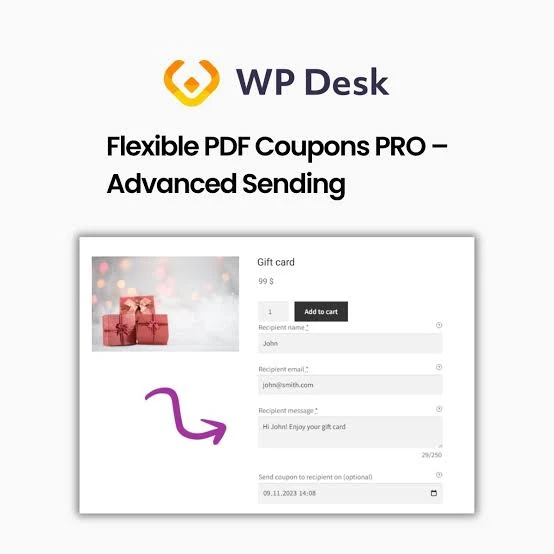
WPDesk Flexible PDF Coupons PRO – Advanced Sending is a WooCommerce extension designed to improve how online stores create and deliver PDF coupons and gift vouchers. It provides additional options for sending personalized coupon documents through email workflows, helping store owners manage promotional offers, customer gifts, and voucher distribution more efficiently.
Suitable for WooCommerce stores that use PDF coupons for promotions, rewards, or gift purchases, this extension focuses on flexible delivery options, recipient management, email customization, and streamlined coupon distribution. Depending on the available configuration, store owners can tailor coupon communications to suit different customer needs and promotional campaigns.
Advanced Coupon Sending: Access additional options for distributing PDF coupons through configured email workflows.
PDF Coupon Delivery: Deliver coupon documents in PDF format to customers or designated recipients.
Personalized Coupons: Customize coupon-related information to create a more relevant experience for recipients, where supported.
Automated Email Sending: Reduce manual work by configuring supported email delivery workflows.
Scheduled Coupon Delivery: Arrange coupon emails for a specified delivery time when scheduling functionality is available.
Recipient Management: Manage the intended recipients of coupon emails according to the extension's supported options.
Custom Email Templates: Adjust email content and messaging to align with your store's branding and communication style.
WooCommerce Integration: Extend coupon delivery workflows within a WooCommerce store.
Gift Voucher Support: Use PDF coupons for gift-giving scenarios and promotional voucher campaigns.
PDF Coupon Attachments: Include coupon documents as email attachments where supported by the configured workflow.
Bulk Coupon Sending: Simplify distribution when sending multiple coupons through supported bulk-delivery features.
Flexible Delivery Options: Adapt coupon delivery to different promotional requirements and customer communication needs.
Managing coupon delivery manually can become time-consuming when an online store runs frequent promotions or handles multiple gift voucher orders. The Advanced Sending extension is designed to provide more flexibility when distributing PDF coupons through email.
By configuring suitable delivery workflows, store owners can streamline coupon distribution and reduce repetitive administrative tasks.
Personalized communication helps customers understand the purpose of a coupon and how it relates to their purchase or gift. Email customization options can help store owners prepare messages that include relevant information and reflect their brand identity.
Depending on the available settings, different email messages may be configured for specific coupon delivery scenarios.
PDF coupons can be useful for seasonal sales, customer appreciation campaigns, gift purchases, and special promotional offers. With appropriate configuration, store owners can use coupon delivery workflows to distribute vouchers to customers or gift recipients.
Clear email instructions and accurate recipient details help make the delivery process easier for customers.
Automated and flexible sending options can help reduce the time required to process coupon emails. Where supported, scheduling and bulk-delivery functionality can also assist stores that manage promotional campaigns or larger volumes of coupon distributions.
Store owners should test email delivery and attachment handling before using these workflows for important customer orders.
Online retail stores: Send PDF coupons associated with customer purchases or promotions.
Gift voucher businesses: Deliver printable vouchers to buyers or intended recipients.
Seasonal campaigns: Distribute coupons for holidays, special events, or limited-time offers.
Customer loyalty initiatives: Share promotional rewards with eligible customers.
Marketing campaigns: Coordinate coupon distribution with store promotions and email communications.
WooCommerce administrators: Manage coupon delivery processes with fewer repetitive manual steps.
Check requirements: Confirm that WooCommerce and the required PDF coupon plugin are installed and compatible with the extension.
Install the extension: Upload the authorized plugin package through your WordPress dashboard.
Activate the plugin: Enable the extension and confirm that the required components are active.
Review sending settings: Open the relevant plugin settings and configure the available delivery options.
Customize email content: Adjust supported email templates and customer-facing messages.
Configure recipients: Set up recipient details according to the available workflow.
Test PDF delivery: Send a test coupon email and verify the attachment, formatting, and recipient information.
Review automation: If scheduling or bulk sending is supported by your installed version, test these options before using them in a live campaign.
Note: Exact menu names and configuration steps may vary by plugin version and the installed PDF coupon solution.
Get Support
Please Sign In to contact our support.