🎃 Halloween Sale — Scary Good Deals, Up to 20% OFF! Don't be spooked by these prices — grab them before they disappear at midnight.
WP Media Folder is a WordPress media management plugin designed to make organizing and managing website files easier. It adds folder-based organization to the WordPress Media Library, helping website owners arrange images, documents, videos, and other media assets into a more structured system. Whether you manage a business website, blog, online store, portfolio, or content-heavy WordPress site, WP Media Folder can help simplify media organization. With folder management, drag-and-drop organization, search tools, and bulk management options, you can spend less time locating files and more time maintaining your website.
WP Media Folder – WordPress Media Library Organization Plugin
WP Media Folder is a WordPress media management plugin designed to make organizing and managing website files easier. It adds folder-based organization to the WordPress Media Library, helping website owners arrange images, documents, videos, and other media assets into a more structured system.
Whether you manage a business website, blog, online store, portfolio, or content-heavy WordPress site, WP Media Folder can help simplify media organization. With folder management, drag-and-drop organization, search tools, and bulk management options, you can spend less time locating files and more time maintaining your website.
Media Library Organization – Arrange media files into folders for easier access and management.
Folder and Subfolder Management – Create a structured hierarchy to organize assets by project, category, or purpose.
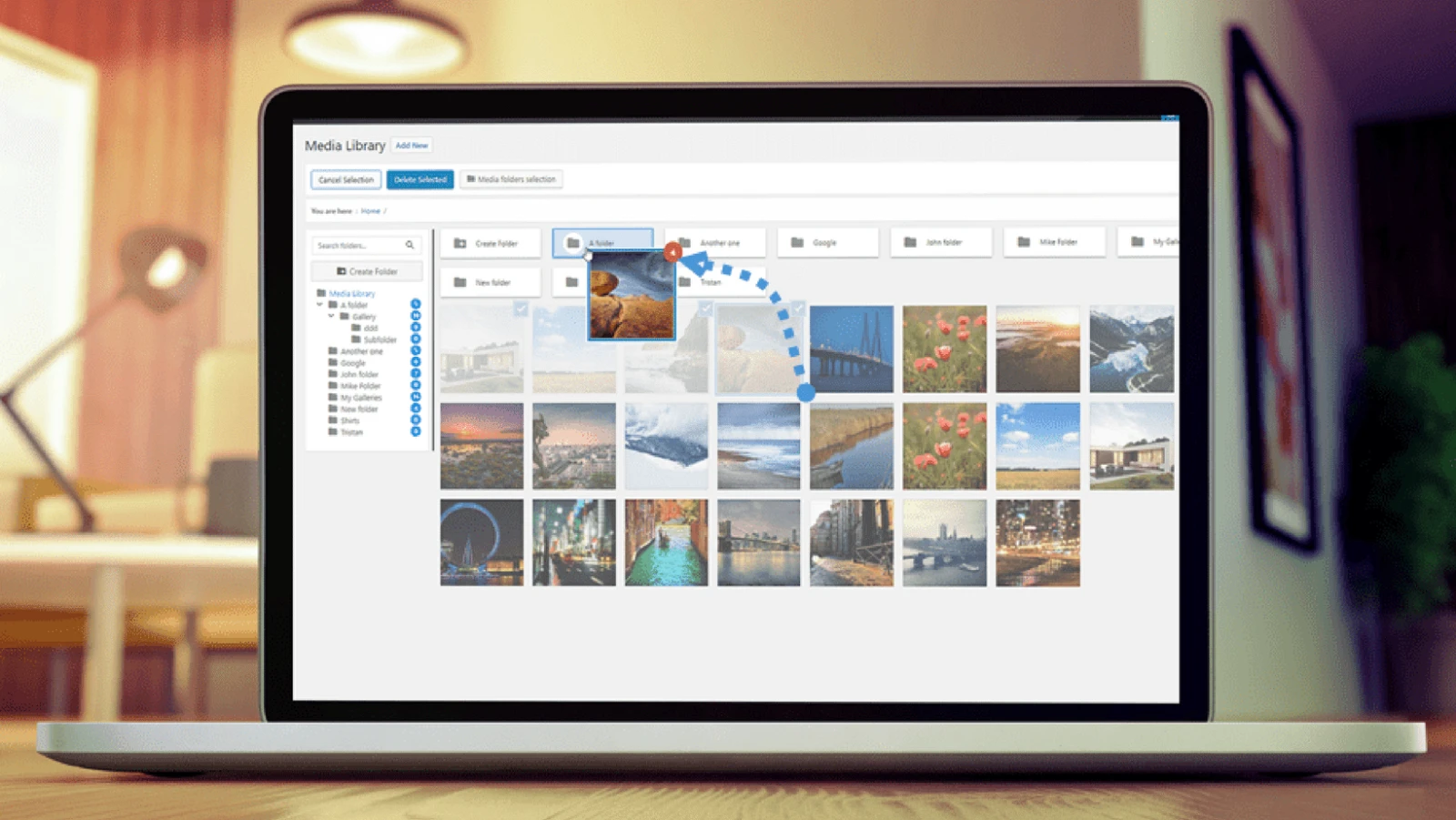
Drag-and-Drop Organization – Move supported media items between folders using a convenient visual workflow.
Media Search and Filtering – Find files more efficiently using available search and filtering tools.
Bulk Media Management – Organize multiple media items more efficiently where bulk actions are supported.
Image and File Management – Keep images, documents, videos, and other supported file types organized.
Media Categorization – Group assets according to website sections, campaigns, products, or content topics.
WordPress Media Library Integration – Manage media through a workflow connected to the familiar WordPress dashboard.
Gallery and Media Display Tools – Access supported gallery or media display features, depending on the edition and configuration.
Improved Content Workflow – Reduce the time spent searching for files across larger media collections.
As a WordPress website grows, its Media Library can accumulate thousands of images, documents, and other files. Finding a specific asset among a large collection may become increasingly difficult.
WP Media Folder introduces folder-based organization to help structure these files. You can arrange media according to website sections, content types, projects, or other categories that suit your workflow.
This approach is useful for developers, designers, bloggers, digital marketers, and website administrators who regularly work with large collections of media assets.
A structured folder system can make media management more predictable and efficient.
WP Media Folder provides folder organization tools that help you group related assets together. Depending on the available functionality, subfolders can provide additional levels of organization for websites with complex content structures.
For example, an online store might organize files into product categories, while a marketing website might separate blog images, landing-page graphics, promotional banners, and downloadable documents.
Moving media files individually through a traditional workflow can be time-consuming when managing a large library.
Where supported, drag-and-drop organization lets you move media items between folders through a visual interface. This can make it easier to reorganize assets when website content changes or new projects are added.
A more visual organization process can also help teams maintain consistent folder structures over time.
Quick access to the right file is important when creating pages, editing posts, or updating product listings.
WP Media Folder's advertised organization workflow includes media search and filtering capabilities. These tools can help narrow down a collection and locate relevant assets more efficiently.
For websites with extensive media libraries, improved file discovery can reduce repetitive searching and make everyday content editing more convenient.
Website administrators often need to organize multiple files at once, especially when migrating content, refreshing a website design, or updating product images.
Bulk media management features, where available, can help streamline repetitive actions. Rather than handling every file separately, users can work with multiple selected items using the supported controls.
Check the available bulk actions in your installed version to understand which operations can be performed together.
A website's media collection may include more than photographs. It can contain PDF documents, marketing graphics, videos, downloadable resources, product images, and other supported file types.
Using a consistent folder structure helps keep these resources organized and makes it easier to locate the correct asset when updating website content.
The exact file types and management options available depend on WordPress, the plugin version, and any additional extensions you use.
Images and other media assets are frequently reused across landing pages, blog posts, product pages, and promotional content.
WP Media Folder is associated with additional media organization and display capabilities, with specific gallery tools depending on the edition and configuration. These features may help streamline the process of locating assets and preparing them for website presentation.
Review the features included in your chosen version before relying on specific gallery layouts or integrations.
An organized Media Library can simplify recurring tasks for website owners and development teams.
By grouping files logically and using available search and organization tools, you can establish a repeatable process for managing media as your website expands.
This can be especially beneficial for agencies maintaining several content-heavy websites, online stores with many product images, and publishers that regularly upload new resources.
Get Support
Please Sign In to contact our support.