🎃 Halloween Sale — Scary Good Deals, Up to 20% OFF! Don't be spooked by these prices — grab them before they disappear at midnight.
Team Showcase is a WordPress plugin designed to help businesses, agencies, organizations, and creative professionals introduce their teams through attractive, organized profile displays. It allows you to present essential information about team members, including photos, job titles, biographies, and social media links, in a professional website layout. Whether you are building a corporate website, agency portfolio, school website, nonprofit platform, or business landing page, Team Showcase can help visitors learn about the people behind your organization. Its advertised layout options and shortcode integration make it easier to add team profiles to different areas of your WordPress website.
Team Showcase – WordPress Team Members Plugin (GPL Download)
Team Showcase is a WordPress plugin designed to help businesses, agencies, organizations, and creative professionals introduce their teams through attractive, organized profile displays. It allows you to present essential information about team members, including photos, job titles, biographies, and social media links, in a professional website layout.
Whether you are building a corporate website, agency portfolio, school website, nonprofit platform, or business landing page, Team Showcase can help visitors learn about the people behind your organization. Its advertised layout options and shortcode integration make it easier to add team profiles to different areas of your WordPress website.
The supplied 5ivecode.com listing advertises a GPL version with lifetime free updates and limited email support. Check the seller's current terms before purchasing.
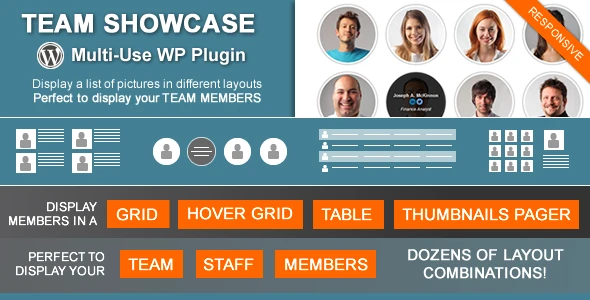
Multiple Display Layouts: Present team profiles using grid, slider, list, or table layouts, depending on the available options.
Detailed Team Member Profiles: Add names, profile photos, job titles, biographies, and contact information.
Social Media Integration: Include links to supported social networks such as Facebook, LinkedIn, and X (formerly Twitter).
Customizable Appearance: Adjust available colors, fonts, and layout settings to complement your website's branding.
Responsive Design: Display team profiles across desktop computers, tablets, and mobile devices.
Shortcode Integration: Place team showcases within compatible WordPress pages, posts, and page-builder layouts.
Centralized Team Management: Manage member details and profile content through the WordPress administration area.
SEO-Conscious Presentation: Organize team information in a structured format that can support website usability and discoverability.
GPL Licensing: The supplied listing describes GPL licensing and unlimited website usage, subject to applicable license terms.
Update and Support Options: The seller advertises lifetime free updates and limited email support; verify the current conditions before ordering.
Team Showcase helps you introduce the people who contribute to your business or organization. Create individual profiles with relevant information so visitors can understand each person's role, experience, and professional background.
This can be especially useful for companies that want to build credibility, agencies highlighting their specialists, and organizations introducing staff members to their audiences.
Different websites require different presentation styles. The plugin's advertised grid, slider, list, and table layouts give you options for organizing profiles according to your page design and content requirements.
For example, a grid may suit a corporate team page, while a slider can be useful for displaying selected team members in a smaller section of a landing page. The layouts available depend on the installed version.
Provide visitors with useful details about each team member. Depending on the available fields, profiles can include:
Full name and profile photograph.
Job title or professional designation.
Biography and background information.
Contact details, where appropriate.
Links to social media profiles.
These details help make your team page more informative and give visitors a clearer understanding of your organization's people and expertise.
Add social profile links to help visitors discover team members on supported platforms. This can be useful for professional networking, agency introductions, and business websites where visitors may want to learn more about individual contributors.
Available social networks and display options may vary by plugin version.
Use the available appearance settings to create a team section that complements your website's existing style. Depending on the plugin configuration, customization may include colors, typography, spacing, and layout choices.
A consistent design helps your team showcase feel like a natural part of your WordPress website.
Responsive layouts help team profiles adjust to different screen sizes. Visitors can browse staff information on desktops, tablets, and smartphones without relying on a desktop-only presentation.
The final appearance depends on your WordPress theme, plugin settings, and the layout you choose.
The supplied product description lists shortcode support for placing team displays within compatible content areas. This can make it easier to add staff profiles to an About Us page, homepage, agency landing page, or dedicated team directory.
The listing also describes compatibility with page builders through shortcodes. Confirm compatibility with your specific builder and plugin version before installation.
Get Support
Please Sign In to contact our support.