🎃 Halloween Sale — Scary Good Deals, Up to 20% OFF! Don't be spooked by these prices — grab them before they disappear at midnight.
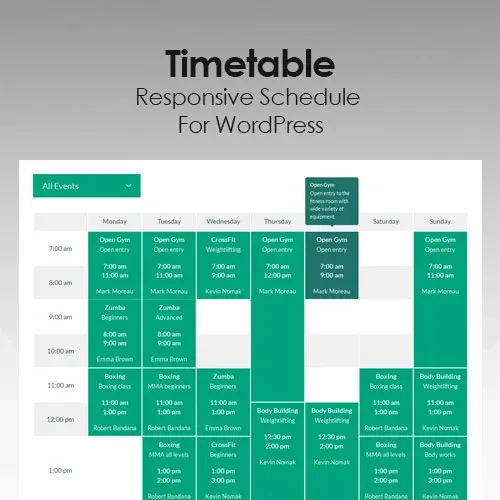
Timetable Responsive Schedule for WordPress is a scheduling solution designed to help website owners create, organize, and display timetables directly on their WordPress websites. It provides a structured way to present time-based information, including classes, events, appointments, activities, and other scheduled sessions, in an easy-to-follow format. Whether you manage an educational website, fitness center, training institute, event platform, business website, or service-based organization, this solution can help you present schedules in an organized and accessible way. Its responsive layout approach helps visitors view timetable information across desktop computers, tablets, and mobile devices.
Timetable Responsive Schedule for WordPress – Responsive Timetable and Schedule Plugin
Timetable Responsive Schedule for WordPress is a scheduling solution designed to help website owners create, organize, and display timetables directly on their WordPress websites. It provides a structured way to present time-based information, including classes, events, appointments, activities, and other scheduled sessions, in an easy-to-follow format.
Whether you manage an educational website, fitness center, training institute, event platform, business website, or service-based organization, this solution can help you present schedules in an organized and accessible way. Its responsive layout approach helps visitors view timetable information across desktop computers, tablets, and mobile devices.
With flexible schedule presentation options, Timetable Responsive Schedule for WordPress can make it easier for visitors to find relevant dates, times, and activities without navigating through multiple pages.
WordPress Timetable Management – Create and organize schedules for different activities, sessions, and events.
Responsive Schedule Layouts – Present timetable information in layouts designed to adapt to different screen sizes.
Event Schedule Display – Arrange event dates, times, and related details in a structured format.
Class Timetable Support – Display class schedules for schools, colleges, coaching centers, and training programs.
Appointment Schedule Sections – Organize appointment-related time slots and service schedules for website visitors.
Time-Based Content Organization – Group activities according to their scheduled times for easier browsing.
Daily and Weekly Schedules – Present timetable information in daily or weekly formats where supported.
Custom Timetable Layouts – Adapt schedule presentation to suit the website's purpose and design.
Schedule Navigation – Help visitors browse timetable information through available navigation options.
Mobile-Friendly Timetables – Make schedule information easier to access on smartphones and other mobile devices.
Manage schedule information through a structured timetable presentation system. Arrange activities, classes, events, or sessions so visitors can understand what is scheduled and when it takes place.
This approach is useful for websites that regularly publish time-sensitive information and need a consistent way to present it.
A timetable should remain useful regardless of the device used to access it. Responsive schedule layouts are designed to help display schedule details across desktop screens, tablets, and smartphones.
The exact appearance may vary depending on the selected layout, theme styling, and plugin configuration.
Present event information in a timetable format that helps visitors identify scheduled activities and their corresponding times. This can be useful for conferences, workshops, community programs, performances, and other organized activities.
Keeping event details together can make the schedule easier to understand and maintain.
Educational institutions and training providers can use timetable-style displays to organize lessons, courses, and learning sessions. A clearly arranged schedule helps students and visitors review available activities and understand the planned timetable.
Potential applications include schools, colleges, coaching centers, tutoring services, and professional training websites.
Service-based businesses can use schedule sections to present appointment-related information and planned activities. This can help customers understand when particular services or sessions are scheduled.
Please note that displaying a timetable is not necessarily the same as providing a complete appointment booking system. Booking, payment, availability synchronization, and automated reminders depend on the tools and integrations available.
Daily and weekly timetable formats can help organize activities according to their planned times. These views are particularly useful for recurring classes, regular training sessions, fitness programs, and business activities.
Available viewing and navigation options depend on the plugin version and configuration.
Different websites have different scheduling requirements. Timetable Responsive Schedule for WordPress is intended to support flexible presentation so website owners can display schedule information in a way that suits their content and site design.
Review the available customization options to determine which layouts and styling settings are supported by your installed version.
Get Support
Please Sign In to contact our support.