🎃 Halloween Sale — Scary Good Deals, Up to 20% OFF! Don't be spooked by these prices — grab them before they disappear at midnight.
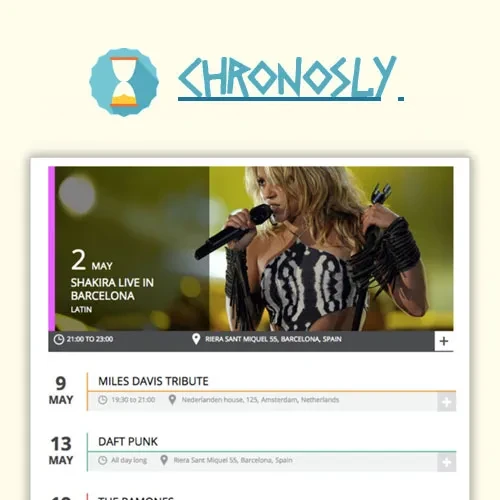
Chronosly Event Calendar is a WordPress event management plugin designed to help website owners create, organize, display, and promote events through customizable calendar and listing layouts. It can be useful for businesses, schools, community organizations, event planners, and other websites that need an organized way to publish event information. With features described for event scheduling, recurring events, ticket sales, social sharing, and layout customization, Chronosly provides tools for presenting event details and helping visitors discover upcoming activities.
Chronosly Event Calendar WordPress Plugin – Event Management and Calendar Solution
Chronosly Event Calendar is a WordPress event management plugin designed to help website owners create, organize, display, and promote events through customizable calendar and listing layouts. It can be useful for businesses, schools, community organizations, event planners, and other websites that need an organized way to publish event information.
With features described for event scheduling, recurring events, ticket sales, social sharing, and layout customization, Chronosly provides tools for presenting event details and helping visitors discover upcoming activities.
The GPL-licensed version is offered through 5ivecode.com, with lifetime free updates and limited email support according to the seller's stated terms.
Event Calendar and Listings – Display events using calendar views and organized event listings.
Single and Recurring Events – Create individual events or repeating schedules where supported.
Event Ticketing – Use available ticketing functionality to manage event registrations or ticket sales.
Payment Integration Options – Connect supported payment methods for eligible ticket transactions.
Customizable Layouts – Adjust event presentation using the available layout customization tools.
Social Sharing – Help visitors share event information through supported social media options.
SEO-Friendly Event Pages – Organize event information in a structure intended to support search engine visibility.
Shortcodes and Widgets – Display event content in supported WordPress areas.
Responsive Presentation – Provide an event browsing experience suitable for desktop and mobile screens, depending on the selected layout and theme.
GPL Licensing – Review the applicable GPL terms for permitted use across personal and client websites.
Seller-Provided Updates – Receive available updates under the lifetime update arrangement advertised by 5ivecode.com.
Chronosly Event Calendar is designed to help website administrators manage event information from their WordPress dashboard. Event pages can present useful details such as event titles, dates, descriptions, venues, organizers, and categories, depending on the available configuration.
This structure helps visitors find the information they need without navigating through unrelated pages.
Websites that publish regular activities may benefit from recurring-event functionality. Instead of creating separate entries for every occurrence, administrators can use the available scheduling options to organize repeating events.
This can be useful for workshops, classes, community meetings, recurring performances, and other regularly scheduled activities.
For event organizers, publishing an event is only one part of the process. Visitors also need a convenient way to learn about the event and, where supported, purchase tickets or complete registrations.
Chronosly's advertised ticketing and payment features are intended to help with event promotion and ticket-related transactions. Verify the supported payment integrations and ticketing workflow before relying on them for a live event.
Different websites have different design requirements. A school may need a simple timetable, while an event agency may prefer visual listings that emphasize dates, venues, and descriptions.
Chronosly offers event layout customization options intended to help administrators present information in a way that fits their website. Available controls may vary by plugin version and configuration.
Event pages can help visitors discover upcoming activities through structured information and shareable links. SEO-friendly page organization may contribute to search engine understanding, although search rankings depend on many factors beyond the plugin itself.
Social sharing options can also help visitors distribute event information to their networks, where supported.
Shortcodes and widgets, when available in the installed version, can provide flexible ways to display event content within supported WordPress areas. This can help integrate calendars and listings into relevant pages without building every display from scratch.
Get Support
Please Sign In to contact our support.