🎃 Halloween Sale — Scary Good Deals, Up to 20% OFF! Don't be spooked by these prices — grab them before they disappear at midnight.
The Events Calendar Shortcode and Templates Pro is an extension designed to expand the event display and layout options available to WordPress websites using The Events Calendar plugin. It helps website owners present event information through different layouts, including lists, grids, carousels, timelines, and other supported templates. Instead of relying only on standard event pages, this extension provides shortcode-based display options that can help you place event content in suitable locations throughout your website. Depending on the available features and configuration, you can organize event listings by categories, tags, venues, or organizers while adapting the presentation to your website's design
The Events Calendar Shortcode and Templates Pro – WordPress Event Display Plugin (GPL)
The Events Calendar Shortcode and Templates Pro is an extension designed to expand the event display and layout options available to WordPress websites using The Events Calendar plugin. It helps website owners present event information through different layouts, including lists, grids, carousels, timelines, and other supported templates.
Instead of relying only on standard event pages, this extension provides shortcode-based display options that can help you place event content in suitable locations throughout your website. Depending on the available features and configuration, you can organize event listings by categories, tags, venues, or organizers while adapting the presentation to your website's design.
Whether you manage a business website, educational institution, community portal, conference platform, or event directory, The Events Calendar Shortcode and Templates Pro can help create a more flexible way to showcase scheduled activities.
Flexible Event Shortcodes – Display event information in supported areas of your WordPress website using shortcode options.
Multiple Event Templates – Present events through available grid, list, carousel, timeline, masonry, and other layouts.
Event Filtering Options – Organize displayed events by supported criteria, such as categories, tags, venues, and organizers.
Responsive Layouts – Use templates designed to adapt to desktop, tablet, and mobile screens.
Ajax-Based Navigation – Browse event listings with asynchronous navigation where supported by the selected template.
The Events Calendar Integration – Extend event presentation options for websites using The Events Calendar plugin.
Customizable Event Designs – Adjust available styling options to suit your website's appearance.
Flexible Content Placement – Add event displays to supported pages, posts, and widget areas.
Improved Event Organization – Present relevant event information in layouts suited to different audiences and website purposes.
GPL Licensing Considerations – Review the license terms of your specific package for applicable usage rights, updates, and support.
The Events Calendar Shortcode and Templates Pro is designed to provide more flexibility when displaying event information. Shortcodes can help you insert event listings into relevant WordPress content instead of restricting visitors to a single predefined event page.
This approach can be useful when creating dedicated event sections for a homepage, service page, community portal, landing page, or other areas of your website.
Different websites benefit from different event presentation styles. A simple list may work well for upcoming activities, while a grid can provide a more visual browsing experience.
Depending on the templates included in your installed version, available layouts may include:
Grid Layout – Arrange events in a structured collection of cards.
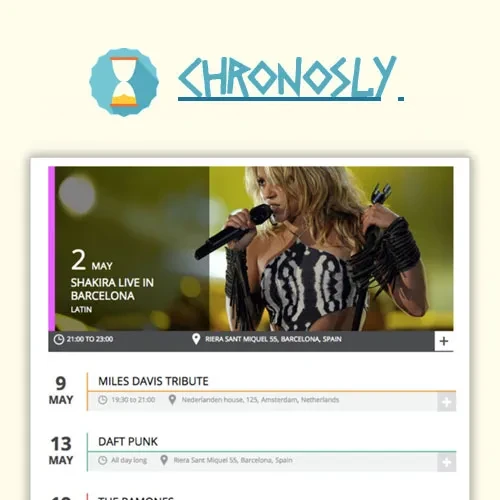
List Layout – Present event titles and details in a straightforward vertical format.
Carousel Layout – Display events in a horizontally navigable presentation where supported.
Timeline Layout – Organize event information in a chronological sequence.
Masonry Layout – Arrange event items in a flexible, staggered presentation where available.
The exact templates and their customization options depend on the plugin version and configuration.
Websites with many scheduled activities need a convenient way to organize their listings. Supported filtering options can help visitors narrow event results and find activities that match their interests.
Depending on the available shortcode parameters and configuration, filtering may use event categories, tags, venues, organizers, or other supported fields.
This can be particularly useful for event directories, educational websites, community platforms, and organizations that publish different types of activities.
The extension is intended to work with The Events Calendar, using its event-management functionality as the foundation for displaying scheduled activities through additional layouts.
Before installation, confirm that your version of The Events Calendar is compatible with the extension. Also review any requirements for related plugins, premium features, or additional components.
Visitors may browse your event listings from desktop computers, tablets, and smartphones. Responsive templates are designed to adjust the presentation to different screen sizes so event information remains accessible.
The final display can depend on the selected template, theme styles, custom CSS, and other installed plugins. Testing the published layouts on multiple devices is recommended.
Where supported, Ajax-based navigation can allow visitors to browse or update event listings without a complete page reload. This can create a smoother browsing experience when exploring larger collections of events.
Actual navigation behavior depends on the selected layout, available filtering features, and plugin configuration.
Event listings should complement the overall design of your website. The extension provides additional presentation options that can help you select suitable layouts and adjust supported styling settings.
For more advanced changes, developers may be able to use custom CSS or other documented customization methods, depending on the available extension features.
Get Support
Please Sign In to contact our support.