🎃 Halloween Sale — Scary Good Deals, Up to 20% OFF! Don't be spooked by these prices — grab them before they disappear at midnight.
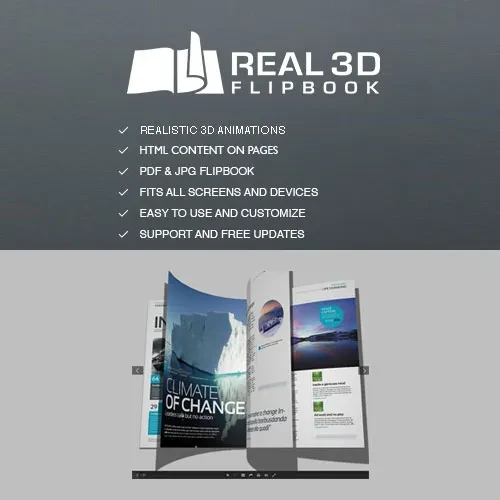
Real 3D Flipbook is a WordPress plugin designed to transform PDFs and supported documents into interactive digital flipbooks. It recreates the experience of browsing a physical book by displaying pages with realistic flipping effects, allowing visitors to explore digital publications directly on your website. Whether you publish product catalogs, magazines, brochures, company profiles, educational materials, reports, or digital books, Real 3D Flipbook can help present documents in an engaging and visually appealing format. Its viewing options, page navigation, zoom controls, and responsive presentation make digital publications easier to browse across compatible devices.
Real 3D Flipbook – Interactive PDF Flipbook Plugin for WordPress
Real 3D Flipbook is a WordPress plugin designed to transform PDFs and supported documents into interactive digital flipbooks. It recreates the experience of browsing a physical book by displaying pages with realistic flipping effects, allowing visitors to explore digital publications directly on your website.
Whether you publish product catalogs, magazines, brochures, company profiles, educational materials, reports, or digital books, Real 3D Flipbook can help present documents in an engaging and visually appealing format. Its viewing options, page navigation, zoom controls, and responsive presentation make digital publications easier to browse across compatible devices.
Realistic 3D Page Flipping – Present digital documents with animated page-turning effects that resemble a physical book.
PDF Flipbook Support – Convert supported PDF documents into interactive online publications.
Responsive Flipbook Viewer – Display publications in a viewer designed to adapt to different screen sizes.
Interactive Page Navigation – Let visitors move between pages using the available navigation controls.
Zoom and Fullscreen Mode – Make document details easier to read with supported viewing options.
Touch and Mobile Support – Enable touch-based navigation on compatible mobile devices.
Customizable Flipbook Layouts – Adjust the presentation using available display and styling settings.
Shortcode Integration – Embed supported flipbooks into WordPress pages and posts using shortcodes.
Lightbox Display – Present a flipbook in an overlay where the feature is supported.
WordPress Integration – Manage and display digital publications through your WordPress website.
Interactive Reading Experience – Make online documents more engaging than a basic static document link.
Traditional PDF links allow visitors to download or open documents, but they may not provide the interactive reading experience that some websites need.
Real 3D Flipbook is designed to present documents with page-turning animations that resemble browsing a printed book. This format can make digital publications more visually engaging while allowing readers to move through the content at their own pace.
It can be useful for businesses, publishers, educators, designers, and organizations that want to display documents directly on their websites.
PDF files are widely used for brochures, catalogs, reports, manuals, and other publications. A flipbook viewer can provide an alternative way to present these files without requiring visitors to use a separate document-reading application.
Real 3D Flipbook supports PDF-based flipbook presentation, subject to the plugin version and configuration. Website owners can prepare their documents and display them through the supported viewer.
Before publishing a document, check that its pages, fonts, images, and formatting appear correctly in the flipbook.
Website visitors may access publications from desktop computers, tablets, or smartphones. A responsive viewer helps the reading experience adapt to different screen dimensions.
Real 3D Flipbook is designed to support responsive presentation, helping visitors browse publications on compatible devices. The actual layout depends on the document dimensions, viewer settings, theme styling, and device being used.
Testing the flipbook on multiple screen sizes can help ensure that text remains readable and navigation controls are easy to use.
Readers need convenient ways to move through a digital publication.
Interactive page navigation allows visitors to browse pages using the controls supported by the viewer. Depending on the configuration, navigation may include moving forward or backward through the document and selecting available viewing controls.
This can make longer publications easier to explore, especially when visitors want to review specific sections of a catalog, brochure, or report.
Small text and detailed images can be difficult to inspect when a document is displayed in a limited area.
Where supported, zoom controls allow readers to enlarge content for closer inspection. Fullscreen viewing can also provide more screen space for browsing a publication without surrounding page elements competing for attention.
These options may be particularly useful for technical manuals, illustrated catalogs, educational documents, and publications containing detailed graphics.
Get Support
Please Sign In to contact our support.