Exclusive Coupon — Use Code SAVE10 for Instant Savings! Apply at checkout for your special discount. Limited uses — grab it while you can.
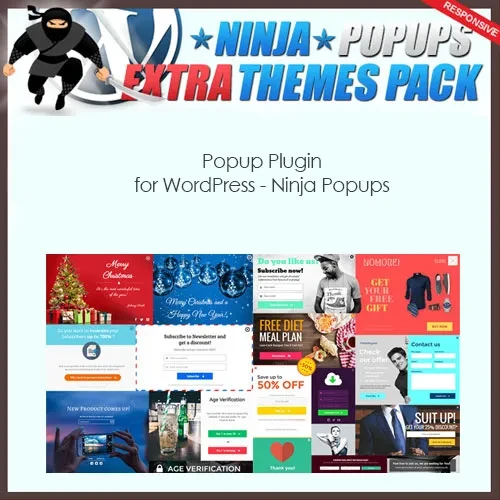
Ninja Popups is a WordPress popup plugin designed to help website owners create customizable popups for lead generation, email list growth, promotional campaigns, and visitor engagement. With popup layouts and display options, it can help present messages, subscription forms, special offers, and other calls to action to website visitors. Whether you run a business website, blog, online store, or digital marketing platform, Ninja Popups can help you create popup campaigns that support your website's marketing goals.
Ninja Popups – Popup Plugin for WordPress
Ninja Popups is a WordPress popup plugin designed to help website owners create customizable popups for lead generation, email list growth, promotional campaigns, and visitor engagement. With popup layouts and display options, it can help present messages, subscription forms, special offers, and other calls to action to website visitors.
Whether you run a business website, blog, online store, or digital marketing platform, Ninja Popups can help you create popup campaigns that support your website's marketing goals.
Custom Popup Builder: Create and customize popup content to suit your website's design and marketing objectives.
Multiple Popup Templates: Choose from available popup designs to build campaigns for different purposes.
Exit-Intent Popups: Display messages when supported exit-intent detection identifies visitors who may be leaving the page.
Timed Popup Triggers: Configure popups to appear after a specified time when supported by the plugin.
Scroll-Based Triggers: Display popups according to visitor scrolling behavior using available trigger settings.
Lightbox Popups: Present promotional messages, forms, or other content in an overlay-style popup.
Responsive Designs: Configure popup layouts for visitors using desktops, tablets, and mobile devices.
Email Marketing Integration: Connect supported email marketing services to help collect and manage subscriber information.
Social Sharing Support: Encourage visitors to share website content through supported social sharing features.
Targeted Display Rules: Control where and when popups appear using the targeting conditions available in your version.
Animation Effects: Apply supported visual effects to customize popup appearances and transitions.
Popup Analytics: Review available campaign statistics or integrate supported tracking tools to evaluate performance.
Specific templates, integrations, trigger types, targeting conditions, and analytics features may vary by plugin version.
Ninja Popups helps WordPress website owners communicate important messages through popup campaigns. These campaigns can be used to encourage newsletter subscriptions, promote limited-time offers, highlight new products, share announcements, or direct visitors toward specific pages.
The plugin's customization options can help website owners adapt popup content to their branding and campaign goals. Trigger settings may allow popups to appear after a delay, during scrolling, or when a supported exit-intent condition occurs.
For websites focused on lead generation, email marketing integrations can help transfer subscriber information to compatible services. Website owners should test each integration and ensure that forms collect information correctly.
For the best visitor experience, use relevant messages, avoid excessive popup frequency, make popups easy to close, and ensure that mobile layouts remain usable. Email collection and tracking should also comply with applicable privacy requirements.
Feature | Ninja Popups | Basic Popup Solutions |
|---|---|---|
Popup customization | Uses available design and configuration options | Depends on the solution |
Popup templates | Available templates depend on the version | May offer limited designs |
Timed and scroll triggers | Depends on supported triggers | Varies by plugin |
Exit-intent display | Check version compatibility | May require an extension |
Email marketing integrations | Depends on supported services | Varies by plugin |
Targeting rules | Depends on available conditions | May be limited |
Analytics | Depends on included tracking features | May require external tools |
Obtain the Ninja Popups plugin ZIP file from your account at 5ivecode.com.
Log in to your WordPress administration dashboard.
Navigate to Plugins → Add New Plugin → Upload Plugin.
Select the downloaded ZIP file and click Install Now.
Activate the plugin after installation.
Open the plugin's settings and select an available popup template or create a custom design.
Configure the popup content, display triggers, and targeting rules.
Connect a supported email marketing service if you plan to collect subscribers.
Preview and test the popup on desktop and mobile devices.
Publish the campaign and monitor any available performance statistics.
Menu names and configuration steps may differ between plugin versions.
Get Support
Please Sign In to contact our support.