🎃 Halloween Sale — Scary Good Deals, Up to 20% OFF! Don't be spooked by these prices — grab them before they disappear at midnight.
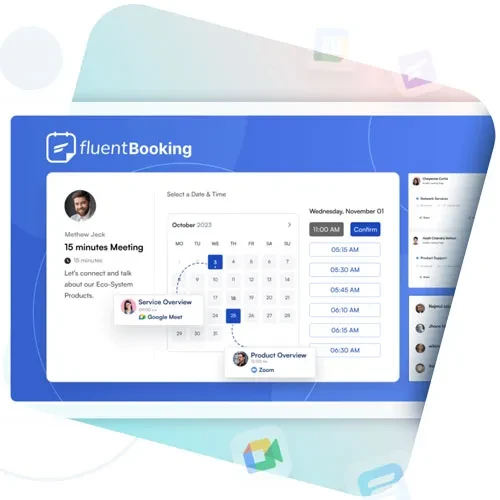
FluentBooking is a WordPress scheduling plugin designed to help businesses, teams, consultants, and professionals organize appointments and meetings through an online booking system. It provides scheduling tools, calendar integrations, availability controls, booking forms, and automated notifications to support a more organized appointment management workflow. Whether you offer client consultations, online meetings, coaching sessions, sales calls, or professional services, FluentBooking can help visitors choose suitable appointment times and make bookings through your WordPress website.
FluentBooking – WordPress Appointment Scheduling and Booking Plugin
FluentBooking is a WordPress scheduling plugin designed to help businesses, teams, consultants, and professionals organize appointments and meetings through an online booking system. It provides scheduling tools, calendar integrations, availability controls, booking forms, and automated notifications to support a more organized appointment management workflow.
Whether you offer client consultations, online meetings, coaching sessions, sales calls, or professional services, FluentBooking can help visitors choose suitable appointment times and make bookings through your WordPress website.
Online Appointment Scheduling: Allow clients to schedule appointments through an online booking interface.
Calendar Integration: Connect supported calendar services to coordinate appointments and availability.
Multiple Booking Types: Configure supported booking options for different appointment requirements.
Team Scheduling: Organize scheduling workflows for teams and multiple professionals using available team features.
Custom Availability: Set working hours, available time slots, and scheduling preferences.
Automated Email Notifications: Send booking-related emails using the available notification settings.
Timezone Support: Help accommodate customers and professionals working across different time zones.
Booking Confirmation: Provide booking confirmation information through supported confirmation options.
Appointment Management: Review and manage scheduled appointments through the WordPress dashboard.
Booking Forms: Collect relevant information from clients during the scheduling process.
Meeting Integrations: Connect supported meeting platforms to facilitate online appointments.
Analytics and Reporting: Review available booking data and reports to understand scheduling activity.
Make it easier for clients to book appointments directly through your WordPress website. FluentBooking provides an online scheduling workflow that allows visitors to review available times and select a suitable appointment slot.
This can reduce the need for lengthy email exchanges and manual coordination, giving both clients and professionals a more convenient way to arrange meetings.
Coordinate appointment schedules with supported external calendar services. Calendar integrations can help professionals review existing commitments and manage their availability alongside scheduled bookings.
Before enabling synchronization, check the supported calendar providers and configure the required account permissions. Test the integration to ensure that appointment availability behaves as expected.
Different businesses require different appointment workflows. FluentBooking is designed to support booking options that can accommodate various scheduling needs, depending on the available features and configuration.
You can organize suitable appointment types for consultations, introductory calls, client meetings, or other services offered through your website.
Manage appointments involving multiple team members or professionals through supported team scheduling capabilities. This can help businesses coordinate availability and organize bookings across different people.
Team configuration options may vary according to the installed edition and setup. Review the available assignment and scheduling controls before implementing a shared booking workflow.
Configure appointment availability to reflect your working hours and scheduling preferences. Availability settings help determine when clients can request meetings and which time slots are presented in the booking interface.
Consider working hours, breaks, existing commitments, and appointment durations when configuring your schedule.
Keep clients and team members informed with booking-related email communications. Depending on the available settings, notifications may cover booking confirmations, appointment updates, cancellations, or reminders.
Configure the appropriate messages and test email delivery before using the system for live appointments. Successful delivery may depend on your WordPress email configuration and connected services.
Make scheduling easier for clients and professionals located in different regions. Timezone-aware booking workflows can help display appointment times appropriately and reduce confusion when arranging remote meetings.
Verify your website's timezone settings and test bookings from different time zones when serving an international audience.
Get Support
Please Sign In to contact our support.