🎃 Halloween Sale — Scary Good Deals, Up to 20% OFF! Don't be spooked by these prices — grab them before they disappear at midnight.
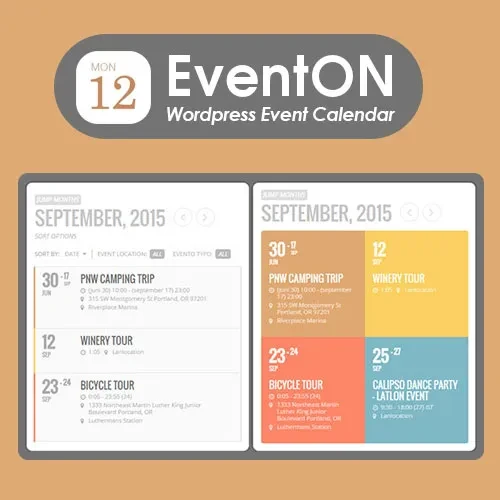
EventON is a feature-rich WordPress event calendar plugin designed to help businesses, event organizers, communities, and website owners create, manage, and showcase events through visually appealing calendar displays. It provides tools for organizing event information, displaying schedules, managing categories, and presenting event details in a user-friendly format. Whether you are promoting conferences, workshops, community gatherings, entertainment programs, business meetings, or educational activities, EventON can help you organize event listings and make upcoming activities easier for visitors to discover.
EventON – WordPress Event Calendar Plugin
EventON is a feature-rich WordPress event calendar plugin designed to help businesses, event organizers, communities, and website owners create, manage, and showcase events through visually appealing calendar displays. It provides tools for organizing event information, displaying schedules, managing categories, and presenting event details in a user-friendly format.
Whether you are promoting conferences, workshops, community gatherings, entertainment programs, business meetings, or educational activities, EventON can help you organize event listings and make upcoming activities easier for visitors to discover.
Interactive Event Calendar: Display scheduled activities through an engaging calendar interface.
Responsive Calendar Layouts: Present event information in layouts designed for different screen sizes.
Event Categories: Group events into relevant categories for easier organization.
Recurring Events: Configure repeating events using supported scheduling options.
Event Search and Filtering: Help visitors locate relevant events through available search and filtering features.
Event Featured Images: Enhance event listings with images that visually represent each activity.
Custom Event Details: Display relevant event information using the available event fields and settings.
Multiple Calendar Views: Choose from supported calendar layouts to suit your website's presentation.
Google Maps Integration: Use supported map integration options to help visitors identify event locations.
Event Location Support: Include venue and location information in event listings.
Event Organizer Information: Present relevant organizer details alongside event information.
Customizable Calendar Styling: Adjust supported appearance settings to complement your website's design.
Present upcoming activities in an organized calendar that helps visitors explore event schedules. EventON is designed to display event information in a visually accessible format, allowing website owners to showcase activities and help users discover relevant dates.
A dedicated event calendar can be particularly useful for websites that publish regular activities or maintain a growing collection of upcoming events.
Display event calendars across desktop computers, tablets, and smartphones using responsive presentation options. A flexible layout helps visitors browse event listings without needing to switch to a separate device or interface.
For the best results, test the calendar with your active WordPress theme to ensure that event details, images, and navigation display correctly on different screen sizes.
Organize events into categories that reflect their purpose or audience. For example, a website might separate educational workshops, business conferences, community activities, and entertainment programs.
Category-based organization can help visitors navigate larger event collections and locate the activities most relevant to them.
Simplify the management of regularly scheduled activities using supported recurring-event options. This can be useful for weekly classes, monthly meetings, repeated workshops, and other activities that follow a predictable schedule.
Configure recurrence settings according to the available options in your installed version, and review the generated event dates before publishing them.
Help visitors find relevant activities using available event search and filtering tools. These features can make event discovery easier when a website contains numerous listings across different dates or categories.
The available search criteria and filtering options depend on the plugin version and configuration.
Add visual elements to event listings to make them more informative and engaging. Featured images can help represent an event's theme, introduce its subject, and create a more appealing presentation.
Use appropriately sized images and consistent visual styles to maintain a clean appearance across your calendar pages.
Include useful information about each event so visitors can understand what to expect before attending. Depending on the available fields and settings, event details may include descriptions, dates, times, venue information, and other relevant content.
Providing accurate and well-organized event information can make listings more useful for prospective attendees.
Get Support
Please Sign In to contact our support.