🎃 Halloween Sale — Scary Good Deals, Up to 20% OFF! Don't be spooked by these prices — grab them before they disappear at midnight.
Booked – Appointment Booking for WordPress is an appointment scheduling solution designed to help businesses manage customer bookings, availability, booking calendars, and appointment details directly through their WordPress websites. It provides tools for organizing appointments and allowing visitors to schedule services through an online booking interface. Whether you run a consulting business, salon, professional service, coaching practice, or another appointment-based operation, Booked can help structure your scheduling workflow and make it easier for customers to request appointments online.
Booked – Appointment Booking for WordPress
Booked – Appointment Booking for WordPress is an appointment scheduling solution designed to help businesses manage customer bookings, availability, booking calendars, and appointment details directly through their WordPress websites. It provides tools for organizing appointments and allowing visitors to schedule services through an online booking interface.
Whether you run a consulting business, salon, professional service, coaching practice, or another appointment-based operation, Booked can help structure your scheduling workflow and make it easier for customers to request appointments online.
Online Appointment Booking: Allow visitors to schedule appointments through your WordPress website.
Custom Booking Calendars: Organize appointment availability using configurable booking calendars.
Flexible Availability Management: Set supported availability options to match your scheduling requirements.
Custom Booking Fields: Collect relevant customer information through available booking form fields.
Guest Booking Support: Allow visitors to make appointments without necessarily creating an account, where supported.
Registered User Bookings: Support appointment scheduling for logged-in users through the available user-booking features.
Appointment Management: Review and manage submitted bookings through the WordPress administration interface.
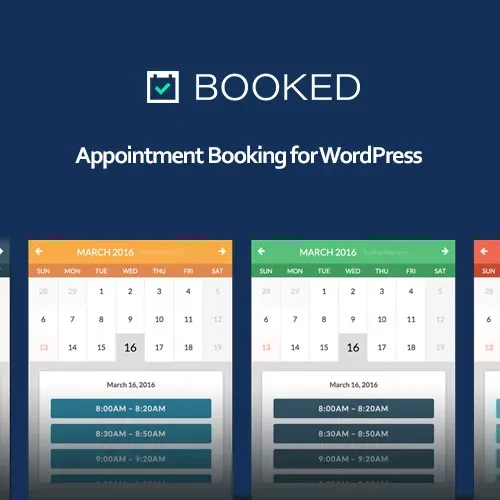
Calendar Views: Display appointments and available time slots using supported calendar layouts.
Email Notifications: Configure booking-related email communications where available.
Booking Restrictions: Apply supported booking rules to control when and how appointments can be scheduled.
WooCommerce Integration: Use supported WooCommerce integration options for compatible booking and commerce workflows.
Responsive Design: Provide a booking experience designed to accommodate desktop, tablet, and mobile screens.
Give customers a convenient way to schedule appointments directly from your website. Booked is designed to provide an online booking process that helps visitors choose from available scheduling options and submit their appointment details.
This can reduce the need to coordinate every appointment manually through phone calls or messages and gives customers a dedicated place to begin the booking process.
Organize appointment schedules with booking calendars that reflect your business requirements. Calendar-based scheduling can help customers identify available dates and help administrators review appointments more efficiently.
Configure the available calendar options to suit your services, operating hours, and appointment workflow.
Manage when appointments can be scheduled using the availability settings supported by the plugin. Appropriate scheduling rules can help align online bookings with your business hours and reduce conflicts between requested appointments.
Review the available controls carefully to ensure your calendar reflects your actual availability.
Collect useful information from customers during the appointment booking process. Custom booking fields can help gather details such as the purpose of an appointment or other information required before a service takes place, depending on the available field options.
Keep booking forms focused on information relevant to your service so customers can complete reservations conveniently.
Make appointment scheduling more accessible by allowing guest bookings where the installed version and configuration support them. This can be useful for businesses that want visitors to submit an appointment request without completing a separate account registration process.
Check the guest-booking settings to confirm how customer information is collected and associated with each reservation.
Support customers who have WordPress accounts through the available registered-user booking functionality. Depending on the configuration, this can help connect appointments with user records and provide a more organized experience for returning customers.
Choose the booking access settings that best suit your website's audience and service requirements.
Get Support
Please Sign In to contact our support.