What is WordPress Store Locator?
WordPress Store Locator – Interactive Store Location Map Plugin
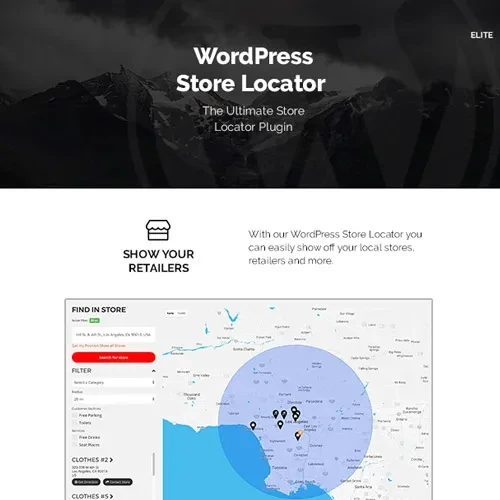
Help customers find your business locations quickly and conveniently with WordPress Store Locator. This location management plugin allows businesses to display multiple stores, dealers, branches, and service points on an interactive map.
Designed for retailers, franchises, distributors, and service providers, it makes location discovery easier with city and ZIP code searches, distance radius filters, current-location search, and driving directions. With customizable map markers and a responsive interface, you can create a convenient store-finding experience for your website visitors.
Feature Highlights
Interactive Map Display: Show business locations on interactive maps using Google Maps or OpenStreetMap.
Location Search: Allow visitors to search for stores by city, ZIP code, or their current location.
Distance Radius Filter: Help customers find nearby locations using adjustable distance ranges, such as 5 km, 10 km, or 50 km.
Unlimited Store Locations: Add multiple stores, dealers, branches, and service points with custom information.
Driving Directions: Help visitors navigate to selected business locations with integrated directions.
Responsive Design: Provide a convenient store locator experience across desktop, tablet, and mobile devices.
Custom Map Markers: Personalize map markers and styling to match your website design.
Google Maps Integration: Display locations using Google Maps services.
OpenStreetMap Support: Use OpenStreetMap as an alternative map provider.
Easy Store Management: Manage store details and map settings through your WordPress dashboard.
Detailed Overview
Interactive Store Location Maps
Display your business locations on an interactive map so customers can easily identify nearby stores, branches, dealers, or service centers. The map provides a visual way to explore your business network and discover available locations.
Google Maps and OpenStreetMap Integration
Choose from the supported map providers to display your store locations. Google Maps and OpenStreetMap integration give website owners flexibility when configuring their location directory.
Google Maps API configuration may be required when using Google Maps. Availability and usage requirements depend on the selected provider and its current policies.
Search by City, ZIP Code, or Current Location
Make location discovery easier by allowing customers to search for stores using familiar location details. Visitors can search by city or postal code, or use their current location where supported and permitted.
Distance Radius Filtering
Help customers narrow down results according to their preferred search distance. Radius options such as 5 km, 10 km, and 50 km make it easier to identify locations within a selected area.
Manage Multiple Store Locations
Add and organize multiple business locations from your WordPress website. Store entries can include relevant details such as:
This makes the plugin useful for businesses operating across multiple cities or regions.
Driving Directions and Route Mapping
Help customers reach their selected destination with driving directions from the map interface. Visitors can use the available routing functionality to navigate to the store they want to visit.
Customizable Map Markers and Styling
Adjust map markers and available styling options to suit your business branding. A consistent visual presentation helps integrate the store locator into your existing website design.
Responsive and Mobile-Friendly Interface
Allow visitors to search for business locations using desktop computers, tablets, and smartphones. Responsive design helps customers access store information while browsing on different devices.
Comparison: WordPress Store Locator vs. Generic Map Plugins
Feature | WordPress Store Locator | Generic Map Plugins |
|---|
Store-specific listings | Designed for business locations | May require additional configuration |
Radius search | Adjustable distance filters | Depends on plugin |
Location search | City, ZIP code, and current location | Varies by plugin |
Driving directions | Integrated directions | May require additional tools |
Map providers | Google Maps and OpenStreetMap | Depends on plugin |
Responsive interface | Mobile-friendly design | Varies by plugin |
Store management | Multiple location entries | May require custom setup |