Exclusive Coupon — Use Code SAVE10 for Instant Savings! Apply at checkout for your special discount. Limited uses — grab it while you can.
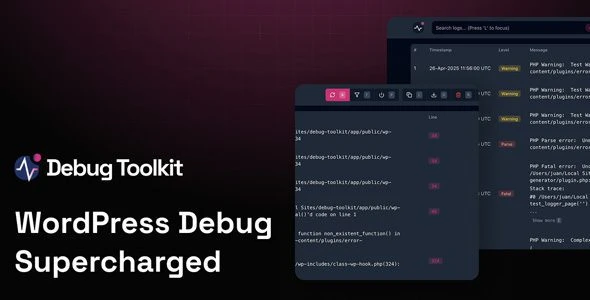
WP Debug Toolkit Pro is a powerful WordPress debugging and monitoring plugin designed for developers, agencies, freelancers, and website administrators. It helps you diagnose errors, monitor performance, troubleshoot plugin and theme conflicts, and identify website issues—all from an intuitive dashboard without editing configuration files or accessing your server via FTP or SFTP. Whether you're maintaining a single website or managing multiple client projects, WP Debug Toolkit Pro provides professional debugging tools that simplify WordPress development and maintenance.
WP Debug Toolkit Pro – Advanced WordPress Debugging & Monitoring Plugin (GPL Licensed)
WP Debug Toolkit Pro is a powerful WordPress debugging and monitoring plugin designed for developers, agencies, freelancers, and website administrators. It helps you diagnose errors, monitor performance, troubleshoot plugin and theme conflicts, and identify website issues—all from an intuitive dashboard without editing configuration files or accessing your server via FTP or SFTP.
Whether you're maintaining a single website or managing multiple client projects, WP Debug Toolkit Pro provides professional debugging tools that simplify WordPress development and maintenance.
🚀 Feature Highlights
✅ Advanced Error Monitoring – Detect PHP errors, warnings, notices, and fatal errors in real time.
✅ Debug Mode Manager – Enable or disable WordPress debugging without manually editing the wp-config.php file.
✅ Performance Monitoring – Identify slow plugins, scripts, database queries, and performance bottlenecks.
✅ Plugin & Theme Conflict Detection – Quickly diagnose compatibility issues affecting your website.
✅ Debug Log Viewer – Access and review WordPress debug logs directly from the admin dashboard.
✅ System Information Report – View PHP version, server configuration, memory usage, WordPress environment, and installed components.
✅ Database Diagnostics – Monitor database performance and identify optimization opportunities.
✅ File-Independent Debugging – Manage debugging features without using FTP, SFTP, or file managers.
✅ Developer-Friendly Tools – Includes advanced diagnostics suitable for developers and agencies.
✅ Responsive Dashboard – Clean, organized interface for monitoring website health.
✅ WordPress Compatible – Supports modern WordPress versions and popular themes and plugins.
✅ Lifetime Free Updates – Receive ongoing updates through 5ivecode.com.
📖 Detailed Overview
WP Debug Toolkit Pro provides everything needed to monitor and troubleshoot WordPress websites from a single interface. Instead of manually modifying configuration files or searching server logs, the plugin centralizes debugging tools inside the WordPress dashboard.
Developers can quickly identify PHP errors, monitor system resources, inspect debug logs, and isolate plugin or theme conflicts. Site owners benefit from easier maintenance, faster troubleshooting, and improved website stability without requiring advanced server access.
Whether you're debugging development environments or resolving production issues, WP Debug Toolkit Pro streamlines the entire process while reducing downtime and maintenance effort.
📊 Comparison Table
Feature WP Debug Toolkit Pro Standard Debugging Methods
Debug Mode Toggle ✔ One Click ❌ Manual File Editing
Error Log Viewer ✔ Built-In ❌ Server Access Required
Performance Monitoring ✔ Advanced ⚠ Limited
Plugin Conflict Detection ✔ Included ❌ Manual Testing
System Diagnostics ✔ Comprehensive ⚠ Basic
FTP/SFTP Required ❌ No ✔ Yes
GPL License ✔ Unlimited Websites ❌ Limited License
⚙ Installation Guide
Download the WP Debug Toolkit Pro (GPL Licensed) ZIP file from your 5ivecode.com account.
Log in to your WordPress Dashboard.
Navigate to Plugins → Add New → Upload Plugin.
Upload the ZIP file and click Install Now.
Activate the plugin.
Open the WP Debug Toolkit Pro dashboard and configure your preferred debugging and monitoring settings.
📜 Licensing Information
WP Debug Toolkit Pro is distributed under the GNU General Public License (GPL).
With your purchase from 5ivecode.com, you'll receive:
✅ 100% Original GPL Plugin
✅ Unlimited Website Usage
✅ No License Key Required
✅ Lifetime Free Updates
✅ Verified Clean & Malware-Free Files
✅ Limited Email Support
❓ Frequently Asked Questions
Does WP Debug Toolkit Pro require FTP access?
No. You can manage debugging settings and monitor logs directly from the WordPress dashboard.
Can I enable WordPress debug mode without editing wp-config.php?
Yes. The plugin allows one-click management of WordPress debugging features.
Does it help identify plugin conflicts?
Yes. It includes tools to diagnose plugin and theme compatibility issues.
Can I monitor website performance?
Yes. The plugin provides performance diagnostics and helps identify slow components affecting your site.
Can I use it on unlimited websites?
Yes. The GPL license allows unlimited installations on both personal and client websites.
💡 Why Choose WP Debug Toolkit Pro?
WP Debug Toolkit Pro simplifies WordPress troubleshooting by bringing professional debugging, monitoring, and diagnostic tools into one centralized dashboard. Instead of manually editing files or accessing server logs, you can quickly identify errors, optimize performance, and resolve compatibility issues with minimal effort.
It's an excellent solution for WordPress developers, agencies, freelancers, and businesses looking to maintain stable, high-performing websites.
🚀 Download WP Debug Toolkit Pro Today
Take control of WordPress debugging with WP Debug Toolkit Pro. Enjoy GPL freedom, unlimited website usage, lifetime updates, and powerful monitoring tools that make troubleshooting faster, easier, and more efficient.
Get Support
Please Sign In to contact our support.