Exclusive Coupon — Use Code SAVE10 for Instant Savings! Apply at checkout for your special discount. Limited uses — grab it while you can.
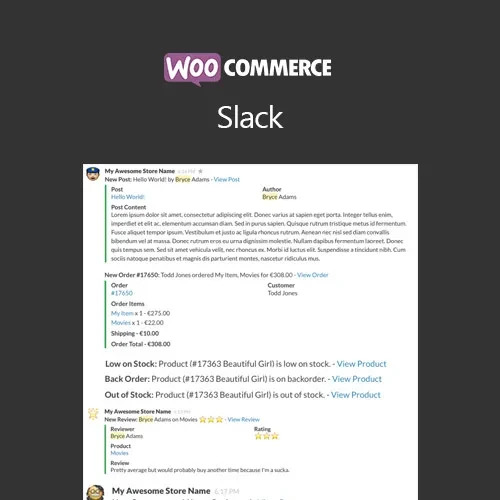
WooCommerce Slack connects your WooCommerce store with a Slack workspace so your team can receive important store notifications directly within Slack. Instead of repeatedly checking the WordPress dashboard for every update, administrators and team members can receive alerts for supported WooCommerce events in configured Slack channels. The plugin is useful for e-commerce businesses, store managers, agencies, and development teams that already use Slack for internal communication. Notifications can help teams stay aware of new orders, refunds, stock-related events, product reviews, and other supported WooCommerce activities.
WooCommerce Slack (GPL Plugin)
WooCommerce Slack connects your WooCommerce store with a Slack workspace so your team can receive important store notifications directly within Slack. Instead of repeatedly checking the WordPress dashboard for every update, administrators and team members can receive alerts for supported WooCommerce events in configured Slack channels.
The plugin is useful for e-commerce businesses, store managers, agencies, and development teams that already use Slack for internal communication. Notifications can help teams stay aware of new orders, refunds, stock-related events, product reviews, and other supported WooCommerce activities.
The plugin is distributed under the GPL (General Public License). The package offered through 5ivecode.com includes lifetime free updates and limited email support according to the applicable package terms.
Send WooCommerce event notifications to Slack
Receive alerts for new orders and other supported order events
Get notifications for refunds and cancellations
Monitor supported low-stock and inventory events
Receive product review notifications
Configure Slack channels for different notification types
Customize supported notification messages
Connect WooCommerce with your Slack workspace
Reduce the need to constantly monitor the WordPress dashboard
Suitable for store owners, agencies, and development teams
GPL-licensed for flexible project usage
WooCommerce Slack creates a communication link between your online store and your team's Slack workspace.
When a configured WooCommerce event occurs, the plugin can send the corresponding notification to Slack. This allows team members to stay informed while working inside their normal communication environment.
For example, an order-management team can receive order alerts in one channel while developers or administrators receive technical or store-related notifications in another.
New orders are among the most important events for an e-commerce team. With supported order notifications enabled, team members can receive information about new purchases through Slack.
This can make it easier for the appropriate staff to notice incoming orders without manually refreshing the WooCommerce administration area.
Refunds and cancellations can require attention from customer service, accounting, or order-management teams.
The plugin can send notifications for supported refund and cancellation events, helping relevant team members become aware of these changes more quickly.
Inventory availability is important for WooCommerce stores. Supported low-stock notifications can be delivered through Slack so that store managers can review products that may require replenishment.
The exact stock-related events available depend on the plugin version and WooCommerce configuration.
Customer reviews can provide valuable feedback about products and customer experience.
With supported review notifications enabled, your team can receive alerts in Slack when relevant product-review events occur, allowing staff to review feedback as part of their normal communication workflow.
Different departments may need different types of WooCommerce information. Where supported, you can configure separate Slack channels for different notification categories.
For example:
Team / Channel | Example Notifications |
|---|---|
Order Team | New orders, cancellations |
Customer Support | Refunds, customer-related events |
Inventory Team | Low-stock notifications |
Product Team | Product reviews |
Management | Selected store activity |
This type of organization can help reduce unnecessary notifications for team members who do not need every store event.
Get Support
Please Sign In to contact our support.