Exclusive Coupon — Use Code SAVE10 for Instant Savings! Apply at checkout for your special discount. Limited uses — grab it while you can.
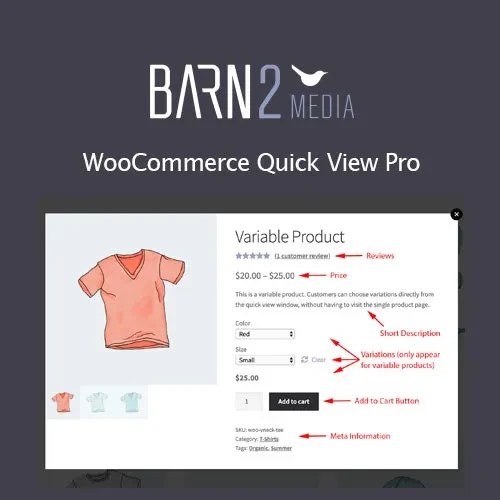
WooCommerce Quick View Pro by Barn2 adds a convenient product-preview experience to WooCommerce stores. Customers can open product information in a popup directly from shop, category, or product-grid pages without navigating away from their current browsing location. The quick-view interface can display product information and purchasing controls, helping shoppers examine products and, where supported, add them to the cart without first opening the full product page. Get the GPL-licensed version from 5ivecode.com, with lifetime free updates and limited email support.
WooCommerce Quick View Pro by Barn2 – Product Preview Plugin
WooCommerce Quick View Pro by Barn2 adds a convenient product-preview experience to WooCommerce stores. Customers can open product information in a popup directly from shop, category, or product-grid pages without navigating away from their current browsing location.
The quick-view interface can display product information and purchasing controls, helping shoppers examine products and, where supported, add them to the cart without first opening the full product page.
Get the GPL-licensed version from 5ivecode.com, with lifetime free updates and limited email support.
Add quick-view popups to WooCommerce product listings
Let customers preview product information without leaving the current page
Display product descriptions, images, pricing, and purchasing options
Support simple, variable, and grouped products
Allow customers to select available variations within the quick-view interface
Add products to the cart directly from the popup
Uses AJAX-based interactions for the quick-view experience
Works with shop pages, category listings, and compatible product grids
Responsive layout for desktop and mobile shoppers
Provides configurable popup presentation and button options
GPL licensing for applicable personal and client projects
Lifetime free updates included with the package
When an online store contains a large number of products, shoppers may need to open several individual product pages just to compare basic information. WooCommerce Quick View Pro by Barn2 provides an alternative by allowing product details to be displayed in a popup from supported product listings.
Customers can open a quick preview, review available product information, select variations where applicable, and use the available purchase controls without having to leave the shop or category page.
The plugin supports different WooCommerce product types, including simple, variable, and grouped products. Its AJAX-powered quick-view functionality is designed to provide an interactive browsing experience while keeping customers on the current listing.
Store owners can also configure aspects of the quick-view presentation to better match the design and shopping workflow of their website.
Feature | WooCommerce Quick View Pro | Standard WooCommerce Browsing |
|---|---|---|
Product Quick View | ✔ Popup-based product preview | ✘ Not provided by default |
Product Details | ✔ View within the quick-view interface | ✔ Available on the product page |
Add to Cart from Quick View | ✔ Supported where applicable | Requires opening the product page |
Variable Products | ✔ Supported | ✔ Supported |
Grouped Products | ✔ Supported | ✔ Supported |
AJAX Interaction | ✔ Used for quick-view functionality | Not part of the standard product-page workflow |
Shop/Category Browsing | ✔ Preview products from listings | Requires product-page navigation |
Responsive Display | ✔ Designed for responsive use | Depends on WooCommerce/theme |
Popup Customization | ✔ Available through plugin settings | Not applicable |
Download the WooCommerce Quick View Pro GPL Plugin from 5ivecode.com.
Log in to your WordPress administration dashboard.
Go to Plugins → Add New → Upload Plugin.
Select the downloaded ZIP package.
Click Install Now and wait for installation to complete.
Activate the plugin.
Open the plugin's available WooCommerce settings.
Configure the quick-view popup layout and appearance.
Adjust button and display settings according to your store's requirements.
Visit your shop or category pages and test the quick-view functionality.
Get Support
Please Sign In to contact our support.