Exclusive Coupon — Use Code SAVE10 for Instant Savings! Apply at checkout for your special discount. Limited uses — grab it while you can.
WooCommerce Purchase Order Gateway adds a dedicated purchase-order payment option to WooCommerce stores, making it easier for business customers and organizations to submit orders using a PO number instead of paying online at checkout. It is particularly useful for B2B stores, wholesale businesses, schools, institutions, government-related organizations, and corporate buyers that follow purchase-order or invoice-based purchasing workflows.
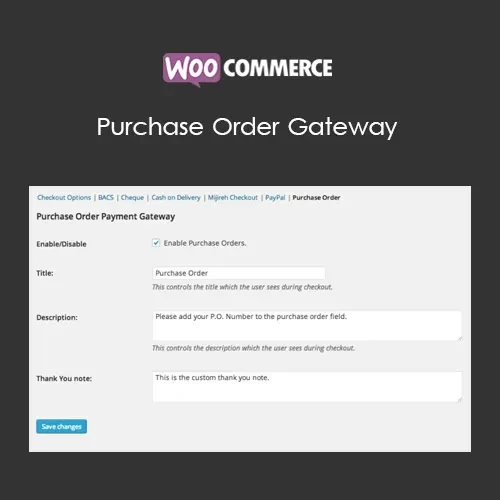
WooCommerce Purchase Order Gateway (GPL) WooCommerce Purchase Order Gateway adds a dedicated purchase-order payment option to WooCommerce stores, making it easier for business customers and organizations to submit orders using a PO number instead of paying online at checkout. It is particularly useful for B2B stores, wholesale businesses, schools, institutions, government-related organizations, and corporate buyers that follow purchase-order or invoice-based purchasing workflows. With this gateway enabled, customers can select the purchase order method during checkout, provide their PO reference, and submit the order for manual review and payment processing. ✨ Feature Highlights ✔️ Add Purchase Order as a WooCommerce payment option ✔️ Allow customers to enter their PO number during checkout ✔️ Keep purchase-order information with the corresponding order ✔️ Provide customized instructions for customers ✔️ Support B2B and wholesale purchasing workflows ✔️ Useful for schools, institutions, companies, and organizations ✔️ Manage PO-based orders through the WooCommerce administration area ✔️ Simple configuration through WooCommerce payment settings ✔️ Lightweight approach for stores that need manual PO processing ✔️ Suitable for compatible WooCommerce themes and extensions ✔️ Distributed under the GPL license 📖 Detailed Overview Streamline Purchase-Order Based Checkout Many business customers do not complete purchases using credit cards or online payment gateways. Instead, they receive an approved purchase order number from their organization and expect the supplier to process the order according to established billing procedures. WooCommerce Purchase Order Gateway adds this type of purchasing workflow to your WooCommerce checkout. Once enabled, customers can choose the purchase-order payment method, enter their PO reference, and submit their order. Your store team can then review the order and follow the organization's normal invoicing or payment procedure. 🏢 Designed for B2B and Wholesale Stores The gateway is a practical choice for stores that sell products to: Wholesale customers Corporate purchasing departments Schools and educational institutions Non-profit organizations Government-related organizations Distributors and resellers Long-term business clients Instead of requiring every customer to use an immediate online payment method, you can provide a checkout option that fits established business purchasing processes. 🧾 Capture Purchase Order References Customers can provide their PO number when placing an order. Keeping this reference with the order makes it easier for your team to identify the related purchase authorization during order management, invoicing, and follow-up. 📝 Add Your Own Customer Instructions You can configure explanatory text to tell customers how your purchase-order process works. For example, instructions can explain where to send purchase-order documents, how approval works, or what customers should expect after submitting an order. ⚙️ Simple WooCommerce Configuration The gateway works through WooCommerce's payment settings, allowing store administrators to enable and configure the purchase-order option without creating a completely separate ordering system. ⚖️ WooCommerce With PO Gateway vs Standard Checkout Feature With Purchase Order Gateway Standard WooCommerce Checkout Purchase order payment option ✅ Available ❌ Not included as a dedicated PO workflow PO number collection ✅ Customers can provide a PO reference ❌ Requires additional customization B2B purchasing workflow ✅ Better suited to PO-based businesses ⚠️ Primarily designed around configured payment methods Manual order processing ✅ Suitable for manual review and payment ⚠️ Depends on the selected payment method Customer instructions ✅ Configurable PO instructions ⚠️ Depends on payment configuration Order PO reference ✅ Stored with the relevant order when supported by the plugin configuration ❌ Not available by default GPL distribution ✅ GPL-licensed package — 🛠️ Installation Guide Obtain the WooCommerce Purchase Order Gateway ZIP package from 5ivecode.com. Sign in to your WordPress administration dashboard. Go to Plugins → Add New → Upload Plugin. Select the plugin ZIP file and click Install Now. Activate the plugin after installation. Confirm that WooCommerce is installed and active. Go to WooCommerce → Settings → Payments. Locate the Purchase Order payment method and enable it. Configure the available title, description, and customer instructions. Save your settings and test the checkout process before making the payment method available to customers.
Get Support
Please Sign In to contact our support.