Exclusive Coupon — Use Code SAVE10 for Instant Savings! Apply at checkout for your special discount. Limited uses — grab it while you can.
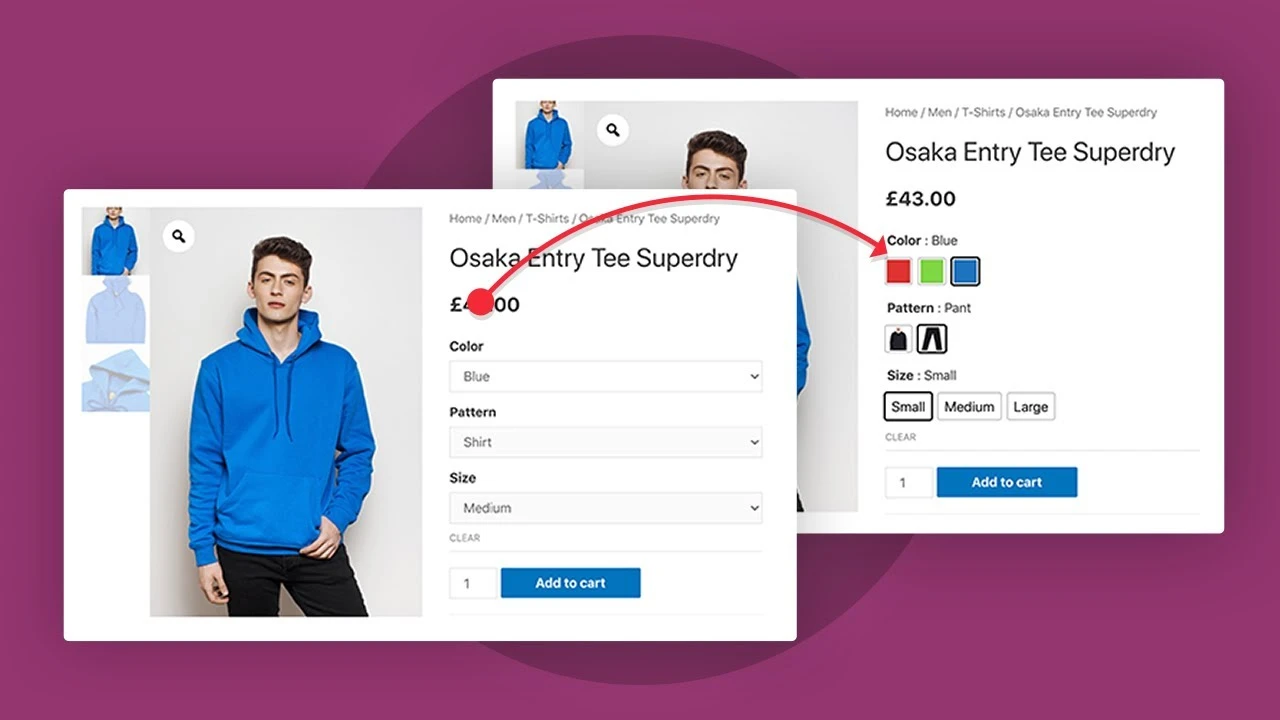
WooCommerce Product Variations Swatches provides a visual alternative to traditional WooCommerce variation dropdowns. For products with multiple options, a standard dropdown can make it difficult for customers to understand what each variation looks like. Swatches provide a more intuitive interface by presenting attributes as colors, images, labels, or styled buttons. For example, a clothing store can display color options as visual color circles or product images instead of asking customers to select a color from a text-based dropdown.
WooCommerce Product Variations Swatches – GPL WooCommerce Plugin Feature Highlights Visual Product Swatches – Replace standard variation dropdowns with color, image, label, or button-style selectors. WooCommerce Variation Support – Add a more visual selection experience to products using WooCommerce attributes and variations. Better Product Option Discovery – Make colors, sizes, styles, materials, and other choices easier for shoppers to understand. Responsive Swatch Interface – Provide a consistent variation-selection experience across desktops, tablets, and smartphones. Custom Image Swatches – Use your own product or attribute images for fabrics, patterns, textures, finishes, and styles. Flexible Swatch Customization – Adjust available dimensions, appearance, spacing, and layout to better match your storefront. Performance-Oriented Design – Built with a lightweight approach for WooCommerce stores where page responsiveness matters. GPL Licensed – GPL-based usage with update and support services available according to the applicable distribution package. Detailed Overview WooCommerce Product Variations Swatches provides a visual alternative to traditional WooCommerce variation dropdowns. For products with multiple options, a standard dropdown can make it difficult for customers to understand what each variation looks like. Swatches provide a more intuitive interface by presenting attributes as colors, images, labels, or styled buttons. For example, a clothing store can display color options as visual color circles or product images instead of asking customers to select a color from a text-based dropdown. Similarly, stores selling furniture, accessories, cosmetics, fabrics, electronics, or other products with multiple attributes can use visual selectors to make product options easier to browse. The result is a cleaner variation-selection experience that can help customers make purchasing decisions with greater confidence. Replace Traditional Dropdowns with Visual Swatches WooCommerce's standard variation selectors are functional, but visual products often benefit from a more graphical interface. Instead of: Color: Select an option ▼ You can present choices such as: Color: ● Black ● Blue ● Red ● Green Or use image-based options for products where appearance is more important than text. This can be especially useful when customers need to compare visual differences between variations. Multiple Swatch Types Different product attributes require different presentation styles. WooCommerce Product Variations Swatches can provide several types of visual selectors. Color Swatches Use color-based selectors for attributes such as: Black White Red Blue Green Gold Silver Image Swatches Use images when a simple color representation is not enough. Image swatches can be useful for: Fabric patterns Wood finishes Product styles Textures Prints Materials Product previews Label Swatches Display variation choices as text labels when customers need to identify specific options. Examples: Small Medium Large XL 128 GB 256 GB Button-Style Swatches Present variation choices using styled buttons for a clean and easy-to-understand selection interface. Custom Image Swatches Image-based attributes can provide significantly more context than simple text. For example, a furniture store could use thumbnail images to represent different wood finishes, while a fashion store could display fabric patterns or clothing colors. Possible applications include: Clothing fabrics Wallpaper patterns Furniture finishes Shoe colors Jewelry styles Cosmetic shades Product textures Material selections You can use appropriate images for your attribute options so customers can visually understand what they are selecting. Improve the Product Selection Experience When customers can clearly see available options, they may spend less time interpreting text-based variation choices. A visual selector can make it easier to understand: Which colors are available Which styles belong to a product Which material is being selected Which size or specification is required Which visual finish matches the customer's preference This can create a more polished product page, particularly for stores where product appearance is an important part of the purchasing decision. While improved UX can support conversion optimization, actual sales results depend on many factors including product quality, pricing, customer demand, page design, checkout experience, and overall store performance.
Get Support
Please Sign In to contact our support.