Exclusive Coupon — Use Code SAVE10 for Instant Savings! Apply at checkout for your special discount. Limited uses — grab it while you can.
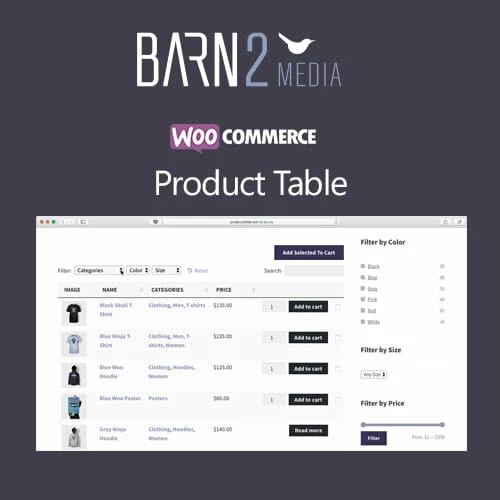
WooCommerce Product Table is a flexible WordPress solution for displaying WooCommerce products in an organized table format. Instead of requiring shoppers to open individual product pages, you can present product information, variations, pricing, and purchasing options in a compact and easy-to-navigate layout. It is particularly useful for stores with large catalogs, wholesale websites, restaurants, product directories, catalogs, and businesses where customers need to compare and order several products quickly.
WooCommerce Product Table – Searchable Product Listing Plugin by Barn2 Media WooCommerce Product Table is a flexible WordPress solution for displaying WooCommerce products in an organized table format. Instead of requiring shoppers to open individual product pages, you can present product information, variations, pricing, and purchasing options in a compact and easy-to-navigate layout. It is particularly useful for stores with large catalogs, wholesale websites, restaurants, product directories, catalogs, and businesses where customers need to compare and order several products quickly. Key Features of WooCommerce Product Table Flexible Table Columns: Choose the product information displayed in each table, including images, names, prices, SKUs, categories, attributes, stock information, and purchasing controls. Product Search: Give customers a quick way to locate products within large catalogs using an integrated search field. Sorting Options: Allow shoppers to arrange products according to supported information such as name, price, SKU, or other available fields. Advanced Filtering: Help visitors narrow down products using categories, tags, attributes, taxonomies, and other supported filters. Bulk Add to Cart: Let customers select several products and quantities before adding multiple items to their shopping cart. Quick Purchase Controls: Place add-to-cart buttons, quantity fields, and other purchasing controls directly within the product table. Variable Product Support: Display product variations with appropriate selection controls such as dropdowns or other supported selectors. Responsive Layout: Adapt product tables for different screen sizes, including smartphones and tablets. WooCommerce Extension Compatibility: Designed to work with compatible WooCommerce extensions and product configurations. Shortcode Support: Insert product tables into pages, posts, landing pages, and other supported WordPress areas using shortcodes. Block Editor Support: Use compatible Gutenberg/block-based functionality where available. Search Engine Friendly Output: Present product information in an accessible structure that can support search engine discovery. Developer Customization: Hooks, filters, and configuration options provide additional flexibility for developers and custom WooCommerce implementations. What’s Included WooCommerce Product Table plugin ZIP package Available premium product-table functionality Table configuration and product-display options Shortcode and supported block functionality Plugin updates according to the applicable license or distribution terms Installation-ready WordPress plugin files License Notice: Site usage, updates, support, and premium services depend on the applicable commercial license or authorized distribution terms. Verify the license associated with your copy before redistributing or installing it across multiple websites. About the Developer WooCommerce Product Table is developed by Barn2 Media, a WordPress plugin company known for creating WooCommerce extensions focused on improving product presentation, ordering workflows, and store functionality. License Information WooCommerce Product Table is commercial software distributed under its applicable software licensing terms. If you are using a GPL-licensed distribution, review the specific license information included with that package before using or redistributing it. When combining the plugin with WooCommerce extensions or third-party services, their respective licensing and usage conditions may also apply. Installation Instructions Download the woocommerce-product-table.zip package from your authorized source. Log in to your WordPress administration dashboard. Navigate to Plugins → Add New → Upload Plugin. Select the WooCommerce Product Table ZIP package. Install and activate the plugin. Open the product table configuration area from your WordPress dashboard. Choose the product columns you want to display. Configure search, sorting, filtering, quantity, and add-to-cart options. Save your settings. Create a new product table using the available shortcode or block functionality. Insert the table into the desired page or post. Test the table on desktop and mobile devices before publishing it to customers.
Get Support
Please Sign In to contact our support.