Exclusive Coupon — Use Code SAVE10 for Instant Savings! Apply at checkout for your special discount. Limited uses — grab it while you can.
WooCommerce Product Showcase Gutenberg Block is a flexible WordPress block designed to help WooCommerce store owners create attractive product displays directly inside the native Gutenberg editor. Build product grids, carousels, sliders, masonry layouts, lists, and curated product sections without depending on a separate page builder. With flexible product selection, responsive design controls, merchandising options, and customer-friendly shopping elements, the block can be used to create product sections for homepages, category pages, landing pages, promotions, campaigns, and other WooCommerce content.
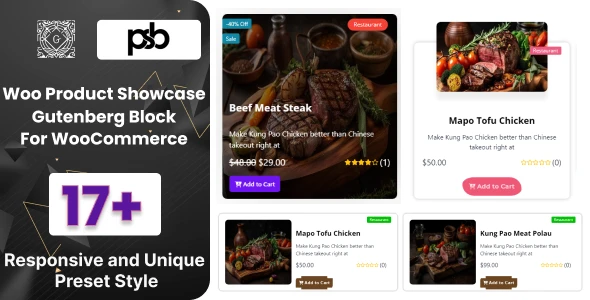
WooCommerce Product Showcase Gutenberg Block WooCommerce Product Showcase Gutenberg Block is a flexible WordPress block designed to help WooCommerce store owners create attractive product displays directly inside the native Gutenberg editor. Build product grids, carousels, sliders, masonry layouts, lists, and curated product sections without depending on a separate page builder. With flexible product selection, responsive design controls, merchandising options, and customer-friendly shopping elements, the block can be used to create product sections for homepages, category pages, landing pages, promotions, campaigns, and other WooCommerce content. 🌟 Key Features ✔️ Multiple Product Layouts – Display products using grids, masonry, carousel/slider, or list layouts. ✔️ Dynamic Product Selection – Query products by category, tag, attribute, sale status, stock status, price, and other available criteria. ✔️ Manual Product Curation – Select specific products when you need complete control over what appears in a showcase. ✔️ Quick View Support – Give shoppers a convenient way to inspect product information without navigating away from the current page, where supported. ✔️ Inline Add to Cart – Provide an accessible purchase action directly within product cards where supported. ✔️ Product Badges – Highlight products with labels such as Sale, New, or Low Stock where configured. ✔️ Flexible Card Design – Adjust images, titles, prices, ratings, buttons, spacing, borders, shadows, and other visual elements. ✔️ Responsive Controls – Configure columns and typography for different screen sizes. ✔️ Lazy-Loaded Images – Supports image-loading strategies intended to reduce unnecessary initial page loading. ✔️ Gutenberg-Native Workflow – Build product sections using the WordPress block editor without requiring a separate page builder. ✔️ Developer-Friendly Options – Custom classes, hooks, and styling possibilities can provide additional control for developers. ✔️ GPL Distribution – Available through 5ivecode.com under applicable GPL terms. ✔️ Lifetime Update Access – Updates are provided according to the distributor's applicable package and service terms. 📖 Product Showcase Block Overview Creating attractive product sections should not require complicated page-builder workflows. The WooCommerce Product Showcase Gutenberg Block adds a dedicated product-display block to the WordPress editor, allowing you to create merchandising sections directly from Gutenberg. You can choose between manually selected products and available dynamic product queries. This makes it possible to create both carefully curated campaigns and automatically updated product sections. For example, you can create: 🏠 Featured products on a homepage 🛍️ Category-based product collections 🔥 On-sale product sections ⭐ Featured or popular product displays 🆕 New-product showcases 📦 Stock-based product collections 🎯 Promotional landing-page sections 🖼️ Visual product lookbooks 📱 Responsive product grids for mobile shoppers The available query and display options depend on the plugin version and configuration. 🧩 Multiple Product Display Layouts Different pages require different presentation styles. WooCommerce Product Showcase Gutenberg Block provides several layout approaches so you can choose the format that best matches your content. Grid Layout Create organized rows and columns of product cards for category pages, landing pages, and standard catalog sections. Masonry Layout Use a masonry-style presentation for a more visual product arrangement, particularly useful for image-focused catalogs and curated collections. Carousel / Slider Present products in a horizontally scrolling format with available navigation, slide-count, autoplay, or loop settings depending on the implementation. List Layout Display products in a more compact vertical arrangement when product information is more important than large visual cards. 🔎 Dynamic Product Queries Instead of manually selecting products every time, use available query controls to automatically populate showcase sections. Depending on the configured options, products can be selected using criteria such as: Product category Product tag Product attributes Featured status Sale status Stock status Price-related conditions Other supported WooCommerce product data This can be useful for creating sections that automatically reflect changes in your catalog. 🎯 Manual Product Selection For marketing campaigns and carefully curated collections, you may want complete control over the displayed products. The block can also support manually selected products, allowing you to build specific collections such as: "Summer Collection", "Editor's Picks", "Best Gifts", or "Featured Products." This combination of manual and dynamic selection gives store administrators more flexibility when building WooCommerce pages. 🛒 Customer-Focused Shopping Elements Product presentation is more useful when customers can interact with products easily. Depending on the available configuration, product cards can include elements such as: Product image Product title Price Rating Sale badge New-product badge Stock-related badge Add to Cart button Quick View action You can decide which elements should appear within your product cards to create a cleaner or more information-rich layout.
Get Support
Please Sign In to contact our support.