Exclusive Coupon — Use Code SAVE10 for Instant Savings! Apply at checkout for your special discount. Limited uses — grab it while you can.
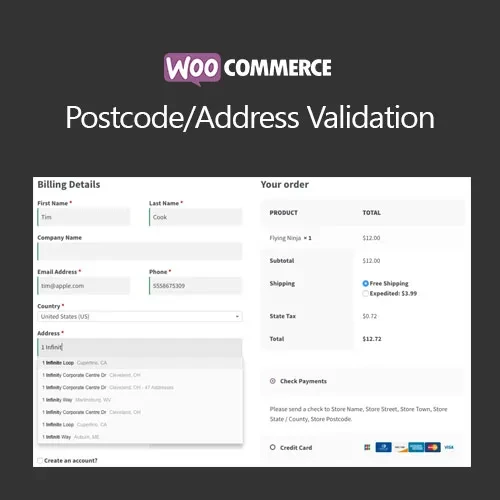
WooCommerce Postcode/Address Validation helps improve the accuracy and usability of your WooCommerce checkout by providing address validation and autocomplete functionality. Instead of requiring customers to manually enter every part of their address, the plugin can provide relevant address suggestions as they type. Depending on the configured provider, customers can select information such as street, city, state, and postcode from available results.
WooCommerce Postcode/Address Validation (GPL) Feature Highlights 📍 Validate customer postcodes and addresses during checkout 🧠 Provide address autocomplete suggestions while customers type 🌍 Support popular address lookup providers such as Google Places and Loqate, where supported ✅ Apply country-specific address formats and validation rules 🛒 Make checkout faster by reducing manual address entry 📦 Improve shipping accuracy and help reduce delivery problems 🧩 Compatible with many WooCommerce checkout, shipping, and custom-field solutions 📱 Responsive and suitable for mobile and desktop checkout experiences 🔓 GPL licensed with unlimited website usage and lifetime free updates Detailed Overview WooCommerce Postcode/Address Validation helps improve the accuracy and usability of your WooCommerce checkout by providing address validation and autocomplete functionality. Instead of requiring customers to manually enter every part of their address, the plugin can provide relevant address suggestions as they type. Depending on the configured provider, customers can select information such as street, city, state, and postcode from available results. Country-aware validation can also help ensure that important address fields follow appropriate formatting and completion requirements. Accurate customer address information can reduce delivery errors, improve shipping calculations, minimize returned packages, and reduce the amount of time your support team spends correcting customer addresses. The plugin is particularly useful for WooCommerce stores that handle frequent deliveries, operate across multiple regions, or want to create a faster and more convenient checkout experience. Comparison Table Capability WooCommerce Postcode/Address Validation Default WooCommerce Address Autocomplete ✔️ Provider-based suggestions ❌ Not included by default Postcode Validation ✔️ Supported ⚠️ Basic field validation Country-Aware Validation ✔️ Configurable validation rules ⚠️ Limited Address Entry Speed ✔️ Fewer manual keystrokes ❌ Manual entry required Delivery Data Accuracy ✔️ Helps reduce address-entry errors ⚠️ Depends on customer input Billing & Shipping Support ✔️ Can be configured for either or both ✔️ Standard fields External Address Providers ✔️ Supported providers where available ❌ Not included GPL Usage ✔️ Unlimited site usage ❌ Not applicable Installation Guide Obtain the WooCommerce Postcode/Address Validation (GPL) ZIP package from 5ivecode.com. Log in to your WordPress administration dashboard. Go to Plugins → Add New → Upload Plugin. Upload the plugin ZIP file. Click Install Now and wait for installation to finish. Click Activate Plugin. Navigate to WooCommerce → Settings and locate the plugin's address validation or integration settings. Select your preferred supported address provider. Enter the required API credentials if the provider requires them. Enable address autocomplete and validation for Billing, Shipping, or both. Save your settings and test the checkout process.
Get Support
Please Sign In to contact our support.