Exclusive Coupon — Use Code SAVE10 for Instant Savings! Apply at checkout for your special discount. Limited uses — grab it while you can.
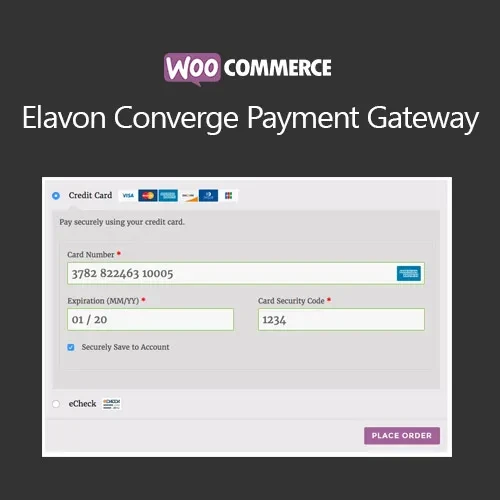
WooCommerce Elavon Converge Payment Gateway connects your WooCommerce store with Elavon Converge, allowing eligible merchants to process credit and debit card transactions through their online store. The integration is designed to provide a streamlined checkout experience while supporting features such as tokenized payment methods, refunds, and payment-security controls. For businesses already using Elavon Converge, this extension can bring payment management closer to the normal WooCommerce workflow. Depending on the gateway version and merchant account configuration, customers can complete payment without being unnecessarily redirected away from the store.
WooCommerce Elavon Converge Payment Gateway (GPL) WooCommerce Elavon Converge Payment Gateway connects your WooCommerce store with Elavon Converge, allowing eligible merchants to process credit and debit card transactions through their online store. The integration is designed to provide a streamlined checkout experience while supporting features such as tokenized payment methods, refunds, and payment-security controls. For businesses already using Elavon Converge, this extension can bring payment management closer to the normal WooCommerce workflow. Depending on the gateway version and merchant account configuration, customers can complete payment without being unnecessarily redirected away from the store. The package available through 5ivecode.com is distributed under the GNU General Public License (GPL) and includes lifetime free updates and limited email support, subject to the applicable offering terms. ✨ Feature Highlights ✔️ Accept supported credit and debit card payments through Elavon Converge ✔️ Integrate Converge payment processing into the WooCommerce checkout ✔️ Tokenization support for eligible saved payment methods ✔️ Manage supported refunds from the WooCommerce administration area ✔️ Access available Converge security and fraud-prevention features ✔️ Support for applicable currencies and international transactions ✔️ SSL/TLS-secured communication when properly configured ✔️ GPL-licensed software with usage rights defined by the applicable GPL terms ✔️ Suitable for stores that already maintain an Elavon Converge merchant account 📖 Detailed Overview Elavon Converge Integration for WooCommerce The WooCommerce Elavon Converge Payment Gateway extension provides a connection between WooCommerce and the Elavon Converge payment platform. Once configured with the required merchant credentials, eligible stores can offer card payments as part of their WooCommerce checkout process. This can help merchants keep payment handling within their existing online-store workflow instead of manually reconciling every transaction outside WooCommerce. Smooth Checkout Experience A well-integrated payment gateway can reduce unnecessary steps during checkout. The extension is designed to connect the Converge payment process with WooCommerce so customers can enter their payment information and complete eligible transactions through the configured checkout flow. The exact checkout behavior can depend on the plugin version, WooCommerce configuration, and current Elavon Converge requirements. Tokenized Payment Methods Tokenization can replace sensitive payment information with a payment token that can be used for eligible future transactions. This can make repeat purchases more convenient while reducing the need for the store to directly handle reusable card details. Tokenization availability and functionality depend on the gateway configuration and the services supported by the merchant's Converge account. Refund Management For supported transactions, merchants can initiate refunds from the WooCommerce administration area rather than manually performing every refund through a separate payment-management interface. This can simplify order administration by keeping the WooCommerce order and refund workflow closely connected to the payment gateway. Fraud & Payment Security Elavon provides payment-security and fraud-management capabilities that may be available through the Converge platform and merchant account. The extension can work with supported gateway security features according to its implementation and configuration. Store owners should still follow recommended WordPress, WooCommerce, hosting, SSL/TLS, access-control, and payment-security practices. International Transactions The gateway can be useful for businesses serving customers in different markets where the merchant's Elavon Converge account supports the required currencies and transaction types. Supported currencies and international processing capabilities are ultimately determined by the merchant account, Elavon services, and current gateway requirements. ⚖️ WooCommerce Elavon Converge vs Basic Payment Setup Feature With Elavon Converge Gateway Basic WooCommerce Setup Elavon Converge integration ✅ Direct gateway connection ❌ Not included by default Credit & debit card processing ✅ Supported through configured Converge account ⚠️ Requires a compatible payment gateway WooCommerce checkout integration ✅ Designed for WooCommerce checkout ⚠️ Depends on installed payment methods Tokenized payment methods ✅ Available where supported ❌ Not provided by basic WooCommerce alone Refund workflow ✅ Supported gateway refunds can be managed from WooCommerce ⚠️ Often requires separate provider access Fraud/security features ✅ Can use supported Converge capabilities ⚠️ Depends on the selected payment provider International transactions ✅ Subject to merchant account and supported currencies ⚠️ Depends on payment provider Payment credentials ✅ Configured through gateway settings ⚠️ Varies by payment method GPL software rights ✅ Governed by the applicable GPL license — 🛠️ Installation Guide Obtain the WooCommerce Elavon Converge Payment Gateway ZIP package from 5ivecode.com. Log in to your WordPress administrator dashboard. Go to Plugins → Add New → Upload Plugin. Upload the plugin ZIP file and select Install Now. Activate the extension after installation. Confirm that WooCommerce is installed and active. Open WooCommerce → Settings → Payments. Locate the Elavon Converge payment method and enable it. Enter the required Converge merchant or API credentials. Configure the available payment, currency, checkout, and transaction options. Save your configuration. Perform a test transaction using the appropriate test/sandbox environment if available before processing live customer payments.
Get Support
Please Sign In to contact our support.