Exclusive Coupon — Use Code SAVE10 for Instant Savings! Apply at checkout for your special discount. Limited uses — grab it while you can.
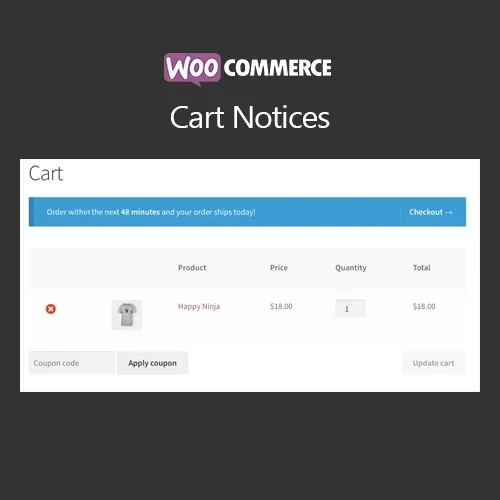
WooCommerce Cart Notices allows you to display targeted messages throughout the WooCommerce shopping journey based on the customer's current cart and checkout conditions. You can use conditional notices to promote special offers, highlight free-shipping thresholds, encourage additional purchases, communicate important cart information, or create promotional messages. Rules can be based on factors such as cart value, products, categories, and shipping methods. Available from 5ivecode.com with GPL licensing, lifetime updates, and limited email support.
WooCommerce Cart Notices GPL Plugin – Dynamic Cart & Checkout Messages
WooCommerce Cart Notices allows you to display targeted messages throughout the WooCommerce shopping journey based on the customer's current cart and checkout conditions.
You can use conditional notices to promote special offers, highlight free-shipping thresholds, encourage additional purchases, communicate important cart information, or create promotional messages. Rules can be based on factors such as cart value, products, categories, and shipping methods.
Available from 5ivecode.com with GPL licensing, lifetime updates, and limited email support.
Conditional Cart Messages – Display relevant notices according to the shopper's current cart situation.
Cart Value Rules – Create messages based on minimum or maximum cart totals.
Product & Category Conditions – Target notices according to selected products or product categories.
Free Shipping Reminders – Let customers know when they need to add more items to reach a configured shipping threshold.
Promotional Messaging – Highlight discounts, promotions, special offers, and other store campaigns.
Multiple Display Locations – Configure notices for supported cart, checkout, shop, or other available locations.
Flexible Rule Configuration – Combine message content with conditions that match your store's promotional strategy.
Shortcode Support – Place supported notices in posts, pages, widgets, or other compatible areas using shortcodes.
Easy Administration – Configure messages and conditions through the WordPress/WooCommerce administration interface.
GPL Usage – Install and customize the plugin according to the applicable GNU General Public License terms.
WooCommerce Cart Notices gives store owners a way to communicate with shoppers based on what is happening in their current shopping session.
Rather than displaying the same message to every visitor, you can create notices that respond to specific conditions. For example, a store can show a reminder when a customer's cart is below a free-shipping threshold or display a promotional message when particular products or categories are included.
Cart notices can also be used for cross-selling and promotional communication. You can encourage shoppers to consider additional products, explain an active promotion, or provide useful information before they complete their order.
Because the messages are connected to configurable conditions, store owners can create different notices for different shopping scenarios instead of relying only on static site-wide announcements.
Capability | With Cart Notices | Without Dedicated Cart Notices |
|---|---|---|
Conditional Messaging | Rules can determine when notices appear | Usually relies on static messaging |
Cart-Based Promotions | Can target specific cart situations | Requires manual or separate implementation |
Free Shipping Reminders | Can display configured threshold messages | Customers may need to calculate the requirement themselves |
Product Conditions | Notices can be associated with selected products | No dedicated notice rules |
Category Conditions | Supported for applicable notice rules | Requires another solution |
Multiple Messages | Different notices can use different conditions | Often requires custom development |
Shortcode Placement | Supported shortcode functionality | Depends on the existing WooCommerce setup |
Download the WooCommerce Cart Notices GPL Plugin from 5ivecode.com.
Log in to your WordPress dashboard.
Go to Plugins → Add New → Upload Plugin.
Upload the plugin ZIP package and activate it.
Open the Cart Notices configuration available through the WooCommerce settings.
Create a new notice and enter the message you want customers to see.
Define conditions such as cart value, products, categories, or shipping methods.
Select the appropriate display location.
Add shortcode-based placement where supported and required.
Save your configuration and test each notice using different cart conditions.
Get Support
Please Sign In to contact our support.