Exclusive Coupon — Use Code SAVE10 for Instant Savings! Apply at checkout for your special discount. Limited uses — grab it while you can.
WooCommerce Branding helps you personalize the appearance and wording of your WooCommerce store so it better reflects your own business identity. Modify standard WooCommerce labels, button text, email branding, and selected administration branding without editing theme files or writing custom code. Whether you are building an online store for yourself or creating WooCommerce websites for clients, this plugin provides a convenient way to replace generic WooCommerce elements with customized branding.
WooCommerce Branding GPL Plugin – Customize Your Store Identity
WooCommerce Branding helps you personalize the appearance and wording of your WooCommerce store so it better reflects your own business identity. Modify standard WooCommerce labels, button text, email branding, and selected administration branding without editing theme files or writing custom code.
Whether you are building an online store for yourself or creating WooCommerce websites for clients, this plugin provides a convenient way to replace generic WooCommerce elements with customized branding.
WooCommerce Text Customization – Replace default labels such as “Add to Cart,” “Checkout,” and other store terminology.
Custom Store Branding – Adapt WooCommerce elements to match your company, brand, or client identity.
Button & Call-to-Action Editing – Personalize important shopping buttons and labels throughout the store.
WooCommerce Email Branding – Add your business logo and customize available email branding elements.
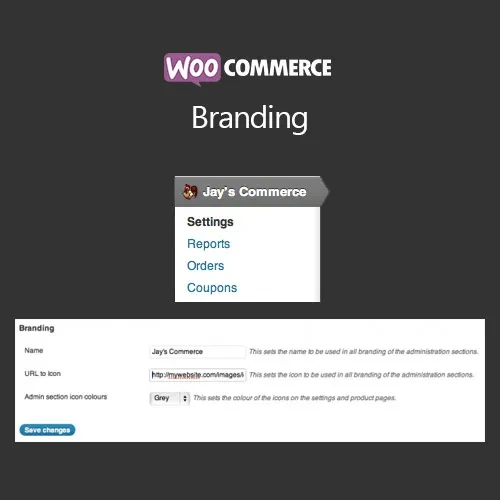
Admin Area Branding – Customize WooCommerce-related branding within the WordPress administration area.
Consistent Customer Experience – Keep store terminology and visual branding aligned across important shopping areas.
No Coding Required – Configure available branding options through the WordPress administration interface.
Suitable for Client Projects – Useful for developers and agencies delivering branded WooCommerce websites.
GPL Distribution – Use the plugin according to the rights and conditions provided by the GNU General Public License.
Lifetime Updates – The package includes lifetime free updates as stated for the product.
A WooCommerce store often contains many default terms, labels, and branded elements that may not match the identity of a particular business. WooCommerce Branding provides a practical way to customize these elements and create a more consistent storefront.
You can change commonly displayed WooCommerce terminology, including shopping and checkout labels, so the wording better suits your products and audience. Button text can also be adjusted to provide calls to action that fit your store's communication style.
The plugin also provides branding options for WooCommerce emails, allowing you to incorporate your business logo and available brand-related settings into customer communications.
For developers working on websites for clients, the administration branding options can help reduce the visibility of standard WooCommerce branding within the backend. This can be useful when delivering a customized WordPress experience to a business owner or internal team.
Configuration is handled through the WordPress dashboard, making the plugin suitable for users who want to make these changes without manually modifying theme or plugin source files.
Feature | WooCommerce Branding | Standard WooCommerce |
|---|---|---|
Custom Store Labels | ✔ Available | ✖ Primarily default wording |
Button Text Customization | ✔ Supported | ✖ Limited by default |
Business Branding | ✔ Customizable elements | ✖ Standard WooCommerce identity |
Email Branding | ✔ Branding options available | ✖ Standard presentation |
Admin Branding | ✔ Customization options | ✖ Default WooCommerce branding |
No-Code Configuration | ✔ Dashboard-based settings | ✖ Manual customization may be required |
Client Website Branding | ✔ Useful for branded projects | ✖ Standard interface |
Download the WooCommerce Branding GPL Plugin package from 5ivecode.com.
Sign in to your WordPress administration dashboard.
Navigate to Plugins → Add New → Upload Plugin.
Upload the downloaded plugin ZIP file.
Install and activate the plugin.
Open the plugin's branding/settings area under the WooCommerce configuration.
Configure your preferred store labels, button text, and other available branding options.
Add your business logo and configure the available WooCommerce email branding settings.
Review the administration branding options if you are preparing the site for a client or team.
Save your configuration and check the storefront, checkout, emails, and other customized areas.
Get Support
Please Sign In to contact our support.