🎃 Halloween Sale — Scary Good Deals, Up to 20% OFF! Don't be spooked by these prices — grab them before they disappear at midnight.
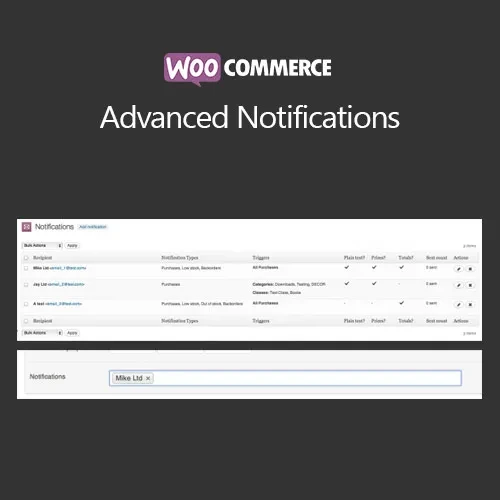
WooCommerce Advanced Notifications is an extension that gives WooCommerce store owners more control over how order, product, and inventory information is communicated. Instead of directing every notification to the primary store administrator, you can create targeted alerts for suppliers, warehouse teams, staff members, drop shippers, and other business contacts. Notifications can be configured around specific products, categories, order conditions, and stock situations. This makes it easier to ensure that each person receives only the information relevant to their responsibilities, helping reduce unnecessary communication and improve day-to-day order fulfillment.
WooCommerce Advanced Notifications (GPL) WooCommerce Advanced Notifications is an extension that gives WooCommerce store owners more control over how order, product, and inventory information is communicated. Instead of directing every notification to the primary store administrator, you can create targeted alerts for suppliers, warehouse teams, staff members, drop shippers, and other business contacts. Notifications can be configured around specific products, categories, order conditions, and stock situations. This makes it easier to ensure that each person receives only the information relevant to their responsibilities, helping reduce unnecessary communication and improve day-to-day order fulfillment. The package available through 5ivecode.com is distributed under the GNU General Public License (GPL) and includes lifetime free updates and limited email support, subject to the applicable offering terms. ✨ Feature Highlights ✔️ Create multiple custom WooCommerce email notifications ✔️ Send alerts to suppliers, staff, warehouses, and other recipients ✔️ Target notifications based on products or product categories ✔️ Trigger notifications using relevant order conditions or statuses ✔️ Configure stock-level and inventory-related alerts ✔️ Support plain-text and HTML email formats ✔️ Send different order information to different recipients ✔️ Useful for multi-supplier and drop-shipping workflows ✔️ Improve communication between store and fulfillment teams ✔️ Extend rather than replace standard WooCommerce notifications ✔️ GPL-based usage across multiple websites, subject to applicable license terms 📖 Detailed Overview WooCommerce Advanced Notifications is designed for stores where different people or organizations need different types of order and inventory information. A single WooCommerce order may involve several stakeholders. A supplier might only need details about products they provide, while a warehouse employee may need shipping or stock information. Sending the complete order notification to everyone can create unnecessary work and expose information that is not relevant to their role. This extension allows store administrators to create targeted notification rules so that relevant information reaches the appropriate recipient. Supplier Notifications Create dedicated notifications for suppliers and configure them around the products or categories they handle. This can make supplier communication more organized in stores with multiple vendors. Staff and Warehouse Alerts Warehouse and fulfillment teams can receive relevant order or stock information without relying on the primary administrator to forward messages manually. Product and Category Rules Build notification rules around specific products or categories. This is particularly useful when different suppliers or departments are responsible for different parts of the catalog. Stock Notifications Set up alerts related to inventory levels so responsible team members can be informed when products reach configured stock conditions. Flexible Email Formats Notifications can be prepared using plain text or HTML formats, allowing you to choose between simple messages and more structured email layouts. Multi-Recipient Workflows Create separate notification rules for different business contacts. This can help coordinate communication between suppliers, fulfillment teams, warehouse personnel, and store administrators. ⚖️ WooCommerce Advanced Notifications vs Default WooCommerce Feature Advanced Notifications Default WooCommerce Custom notification rules ✅ Flexible additional notifications ⚠️ Standard notification system Product-specific notifications ✅ Supported ❌ No dedicated workflow Category-based notifications ✅ Supported ❌ No dedicated workflow Supplier notifications ✅ Supported ⚠️ Requires additional setup Staff/warehouse notifications ✅ Targeted alerts ⚠️ Limited Stock-level notifications ✅ Supported ⚠️ Requires separate monitoring/setup Multiple recipients ✅ Configurable ⚠️ More limited Plain-text emails ✅ Supported ✅ Supported HTML email notifications ✅ Supported ✅ Supported Targeted order information ✅ Configurable ⚠️ Standard notifications GPL usage ✅ Subject to GPL terms — 🛠️ Installation Guide Obtain the WooCommerce Advanced Notifications ZIP package from 5ivecode.com. Log in to your WordPress administration dashboard. Go to Plugins → Add New → Upload Plugin. Select the plugin ZIP file. Click Install Now. After installation is complete, click Activate Plugin. Make sure WooCommerce is installed and active. Open the plugin's notification settings. Create a notification rule and define its recipient. Select the relevant products, categories, order conditions, or stock conditions. Choose the desired email format and notification details. Save your settings. Perform a test order or inventory update to verify that the correct recipient receives the notification.
Get Support
Please Sign In to contact our support.