🎃 Halloween Sale — Scary Good Deals, Up to 20% OFF! Don't be spooked by these prices — grab them before they disappear at midnight.
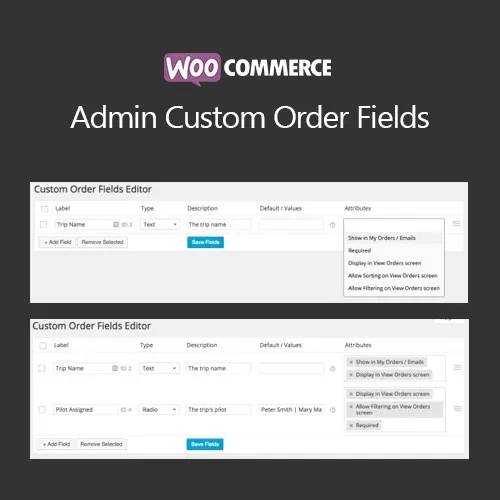
Add the order information your team needs directly inside WooCommerce. With WooCommerce Admin Custom Order Fields, store administrators can create additional fields for internal order management, including text, numbers, dropdowns, checkboxes, text areas, dates, and times. These custom fields can be used for purchase order references, warehouse notes, fulfillment instructions, production details, compliance information, delivery references, and other internal workflows without modifying the customer checkout process.
WooCommerce Admin Custom Order Fields (GPL) Add the order information your team needs directly inside WooCommerce. With WooCommerce Admin Custom Order Fields, store administrators can create additional fields for internal order management, including text, numbers, dropdowns, checkboxes, text areas, dates, and times. These custom fields can be used for purchase order references, warehouse notes, fulfillment instructions, production details, compliance information, delivery references, and other internal workflows without modifying the customer checkout process. Feature Highlights ✅ Multiple Custom Field Types – Create text, number, select, checkbox, textarea, date, and time fields according to your operational requirements. 🧭 Organized Field Placement – Group and arrange custom fields within the WooCommerce order administration interface. 📋 Custom Orders List Columns – Display important field values as columns in the WooCommerce Orders screen for quicker review. 🔎 Search and Filter Support – Locate orders using information stored in custom order fields. ✉️ Email Integration – Include selected custom field values in supported admin or customer email communications. 🛡️ Role-Based Permissions – Control which WordPress user roles can view or edit specific internal information. ⚙️ Developer-Friendly Structure – Use hooks, filters, and standard order metadata to create custom automations, reports, exports, and integrations. Detailed Overview Managing order-specific information through spreadsheets, separate documents, or scattered internal notes can become difficult as an online store grows. WooCommerce Admin Custom Order Fields provides a structured way to store additional operational information directly with each WooCommerce order. Store managers can create custom fields for information such as PO numbers, warehouse references, production instructions, fulfillment notes, delivery details, internal checks, and accounting references. Important values can also be displayed directly in the WooCommerce Orders list, helping staff identify and process orders more efficiently. Search and filtering capabilities can make it easier to locate orders based on specific internal data. For development teams, storing information as order metadata provides a practical foundation for custom reports, exports, automation workflows, CRM connections, ERP integrations, and other custom WooCommerce solutions. Comparison Table Capability WooCommerce Admin Custom Order Fields Typical Alternatives Admin Custom Fields Multiple field types and groups Limited field options Orders List Columns Supported May require custom development Search & Filtering Available for field values Limited or unavailable Email Integration Optional field placeholders Varies by solution User Permissions Role-based controls Often basic or global Developer Extensibility Hooks, filters, and order meta May provide limited APIs Licensing GPL-based distribution Licensing varies Installation Guide Download the WooCommerce Admin Custom Order Fields ZIP package from your 5ivecode.com account. Log in to your WordPress admin dashboard. Navigate to Plugins → Add New Plugin → Upload Plugin. Select the plugin ZIP file. Click Install Now. After installation finishes, click Activate. Go to WooCommerce → Orders and configure the available custom order field settings. Create the fields required for your internal workflow. Optionally display important values as Orders list columns. If supported by your configuration, add selected field placeholders to relevant email templates. Create a test order and verify that the custom values appear, save correctly, and can be searched or filtered as expected.
Get Support
Please Sign In to contact our support.