🎃 Halloween Sale — Scary Good Deals, Up to 20% OFF! Don't be spooked by these prices — grab them before they disappear at midnight.
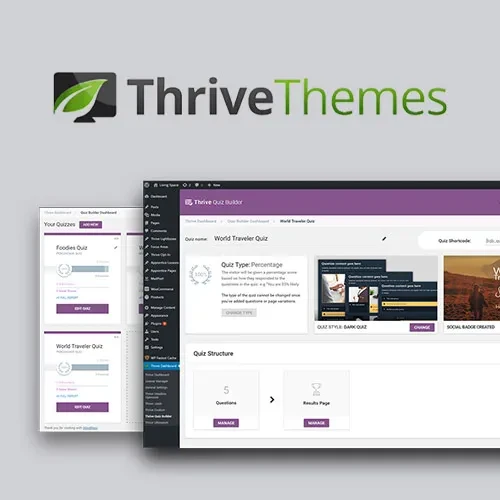
Thrive Quiz Builder is a WordPress quiz creation plugin designed to help website owners create interactive quizzes that engage visitors, generate leads, segment audiences, and measure performance. With customizable question flows, visual editing tools, and personalized result pages, it provides a way to turn ordinary website visits into interactive experiences. Whether you run a blog, business website, digital marketing campaign, online publication, or lead-generation website, Thrive Quiz Builder can help you create quizzes that encourage participation and provide insights into visitor interests and preferences.
Thrive Quiz Builder – Interactive Quiz Creation Plugin for WordPress
Thrive Quiz Builder is a WordPress quiz creation plugin designed to help website owners create interactive quizzes that engage visitors, generate leads, segment audiences, and measure performance. With customizable question flows, visual editing tools, and personalized result pages, it provides a way to turn ordinary website visits into interactive experiences.
Whether you run a blog, business website, digital marketing campaign, online publication, or lead-generation website, Thrive Quiz Builder can help you create quizzes that encourage participation and provide insights into visitor interests and preferences.
Interactive Quiz Builder: Create engaging quizzes that encourage visitors to participate and interact with your website content.
Multiple Quiz Types: Build different quiz experiences to suit your content strategy, audience, and marketing objectives.
Visual Quiz Editor: Design and customize quiz layouts through a visual editing interface.
Question and Answer Management: Organize quiz questions, answer choices, and question sequences to create a structured experience.
Branching Quiz Logic: Configure question paths so that subsequent questions can depend on a visitor's previous answers, where supported.
Personalized Quiz Results: Present result pages tailored to quiz outcomes or user responses.
Lead Generation: Use quizzes as part of your lead-generation strategy to encourage visitor engagement and collect potential customer information.
Email Opt-In Integration: Connect supported email marketing or opt-in workflows to help build your subscriber list.
Social Sharing: Allow visitors to share quiz-related content or results through supported sharing options.
Quiz Templates: Start with available quiz templates and adapt their structure and appearance to your needs.
Result-Based Segmentation: Group participants according to their quiz responses or outcomes to support more relevant follow-up communication.
Quiz Analytics: Review available quiz performance information to understand how visitors interact with your quizzes.
Conversion Tracking: Measure relevant quiz-related actions through supported tracking and analytics integrations.
Responsive Design: Create quizzes designed to work across desktop computers, tablets, and mobile devices.
WordPress Integration: Add quiz experiences to your WordPress website as part of your content and marketing workflow.
Thrive Quiz Builder helps transform static website content into interactive experiences. You can develop quizzes around topics such as product recommendations, knowledge tests, personality assessments, customer preferences, and audience surveys.
By encouraging visitors to answer questions and discover their results, quizzes can make website content more engaging and give users a reason to spend more time exploring your site.
A well-organized question sequence helps participants move through a quiz naturally. Thrive Quiz Builder provides tools for managing questions and answers, while supported branching logic can direct participants along different paths based on their selections.
This approach can be useful for creating quizzes that adapt to user responses rather than presenting every participant with an identical sequence of questions.
Result pages provide an opportunity to deliver relevant information based on quiz outcomes. Depending on the quiz configuration, you can use different results to present recommendations, explain assessment outcomes, or direct visitors toward related website content.
Personalized results can also help make quizzes more useful by connecting a participant's answers with information that matches their interests.
Interactive quizzes can become part of a broader lead-generation strategy. By combining quiz participation with supported email opt-in functionality, website owners can invite interested visitors to subscribe to newsletters or receive additional information.
For a better visitor experience, clearly explain why contact information is requested and obtain appropriate consent before adding people to marketing lists.
Quiz responses can provide useful context about visitor preferences, interests, or knowledge levels. Result-based segmentation can help marketers organize audiences into relevant groups and develop more targeted follow-up content, depending on the available integrations and configuration.
For example, a business could use a product-preference quiz to guide visitors toward relevant product categories or use a knowledge quiz to recommend educational resources.
Understanding quiz performance can help you improve question structure, result pages, and overall engagement. Available analytics and supported tracking integrations may help you assess participation and relevant conversion actions.
Reviewing these insights can help identify areas where participants lose interest and highlight opportunities to improve the quiz experience.
Templates can simplify the initial setup process and provide a starting point for customization. You can adapt the available quiz design to complement your website's branding and content.
Responsive design support helps make quizzes accessible across different screen sizes, allowing visitors to participate using desktop computers, tablets, or smartphones.
Get Support
Please Sign In to contact our support.