Exclusive Coupon — Use Code SAVE10 for Instant Savings! Apply at checkout for your special discount. Limited uses — grab it while you can.
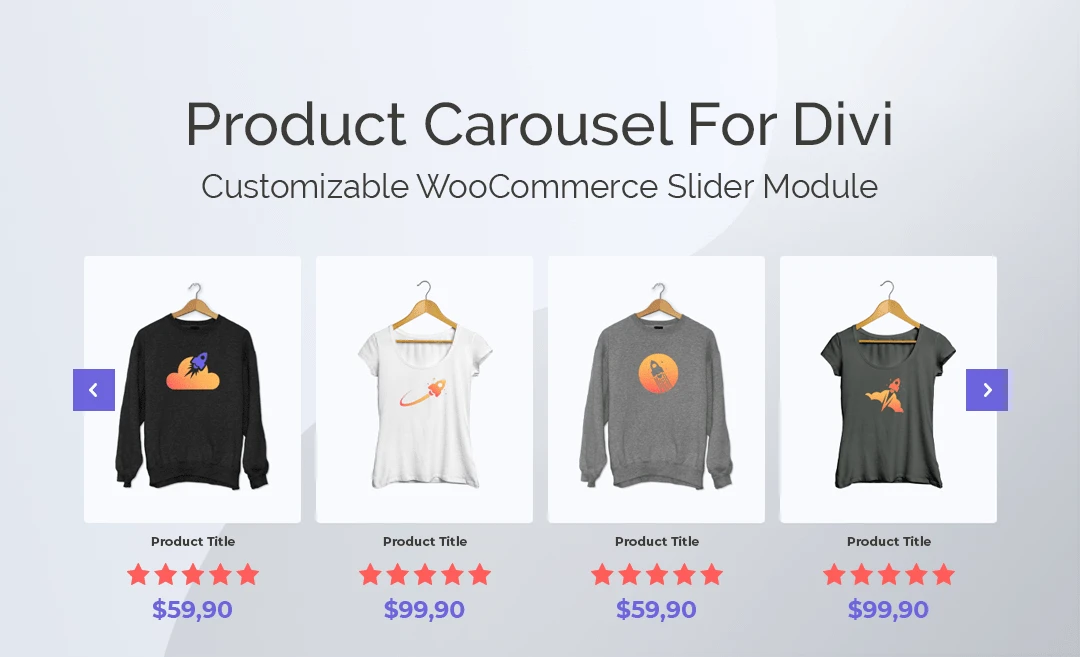
Product Carousel for Divi and WooCommerce is a WordPress plugin designed to help WooCommerce store owners create interactive product carousels using Divi Builder. It provides a visual way to showcase featured products, new arrivals, popular items, categories, and promotional products without relying on a standard static product grid. With configurable carousel layouts, product filtering, navigation controls, responsive settings, and styling options, you can create product displays that fit naturally into pages built with Divi.
Product Carousel for Divi and WooCommerce – WordPress Plugin
Product Carousel for Divi and WooCommerce is a WordPress plugin designed to help WooCommerce store owners create interactive product carousels using Divi Builder. It provides a visual way to showcase featured products, new arrivals, popular items, categories, and promotional products without relying on a standard static product grid.
With configurable carousel layouts, product filtering, navigation controls, responsive settings, and styling options, you can create product displays that fit naturally into pages built with Divi.
The plugin can be useful for eCommerce businesses, WooCommerce store owners, agencies, freelancers, and WordPress developers who want more flexible product presentation options.
The package supplied through 5ivecode.com includes lifetime free updates and limited email support, according to the package offering.
Divi Builder Integration – Add product carousel elements directly to Divi-powered pages using the available builder interface.
WooCommerce Product Display – Showcase WooCommerce products in a dedicated carousel layout.
Responsive Design – Configure product displays for desktop, tablet, and mobile viewing.
Customizable Appearance – Adjust available colors, typography, navigation controls, slide settings, and other presentation options.
Product Filtering – Select products using available categories, tags, popularity, latest products, and other supported criteria.
Multiple Display Layouts – Create different product presentation styles, including supported horizontal, vertical, or grid-oriented layouts.
Navigation Controls – Configure carousel navigation options to help visitors browse products.
Autoplay Options – Enable or configure automatic slide movement where supported.
Featured Product Displays – Highlight selected products, featured collections, best sellers, or promotional items.
Divi-Friendly Workflow – Manage the carousel within the familiar Divi page-building environment.
WooCommerce Compatibility – Designed for WooCommerce product catalogs and common product information.
Pre-Built Display Concepts – Create product sections for featured products, sales items, new arrivals, and other catalog groups.
WooCommerce stores often need to display a large number of products without making every page excessively long. Product Carousel for Divi and WooCommerce provides a way to present selected products in a horizontally or otherwise configured browsable format.
Instead of displaying every product in a large static grid, you can use carousel sections to highlight specific groups of products.
For example, a homepage might contain:
Featured Products → New Arrivals → Best Sellers → Sale Products
Each section can use its own product-selection and presentation settings.
The plugin is designed to work with Divi Builder, allowing administrators to create product carousel sections while building pages.
A typical workflow is:
Open Divi Builder → Add Carousel Module → Select Products → Configure Layout → Customize Design → Publish
This can make it easier for Divi users to incorporate WooCommerce products into landing pages, homepages, promotional pages, and other content areas.
Product carousels can be used to highlight different sections of a WooCommerce catalog, including:
Featured products
New products
Popular products
Best-selling products
Products from selected categories
Products associated with specific tags
Promotional products
Sale items
The exact filtering and sorting choices depend on the available plugin settings.
The plugin can help you control which products appear in a carousel rather than displaying your entire catalog.
Depending on the available configuration, products can be selected or organized using criteria such as:
Product categories
Product tags
Latest products
Popular products
Featured products
Other supported WooCommerce product queries
This makes it possible to create targeted product sections for different areas of your website.
A clothing store could create:
Men's Collection → Category: Men
New Arrivals → Latest Products
Popular Products → Popularity-Based Selection
Sale Collection → Products selected for promotion
The carousel is intended for responsive WooCommerce websites and can be displayed across:
Desktop computers
Laptops
Tablets
Smartphones
Responsive behavior can depend on the configured number of visible products, carousel settings, Divi layout, theme styles, and screen size.
For this reason, it is recommended to preview and test each carousel at different breakpoints before publishing.
Get Support
Please Sign In to contact our support.