🎃 Halloween Sale — Scary Good Deals, Up to 20% OFF! Don't be spooked by these prices — grab them before they disappear at midnight.
Print Orders and Address Labels for WooCommerce is a practical order-printing solution for online stores that need an easier way to prepare invoices, packing documents, and shipping/address labels. It brings essential printing tools into the WooCommerce order management workflow, helping store administrators and fulfillment teams handle daily order processing more efficiently. With support for individual and bulk printing, customizable document layouts, and different printer setups, the plugin can help reduce repetitive manual tasks and keep shipping paperwork organized.
Print Orders and Address Labels for WooCommerce Print Orders and Address Labels for WooCommerce is a practical order-printing solution for online stores that need an easier way to prepare invoices, packing documents, and shipping/address labels. It brings essential printing tools into the WooCommerce order management workflow, helping store administrators and fulfillment teams handle daily order processing more efficiently. With support for individual and bulk printing, customizable document layouts, and different printer setups, the plugin can help reduce repetitive manual tasks and keep shipping paperwork organized.
Available through 5ivecode.com under applicable GPL terms, with lifetime access to available updates and limited email support.
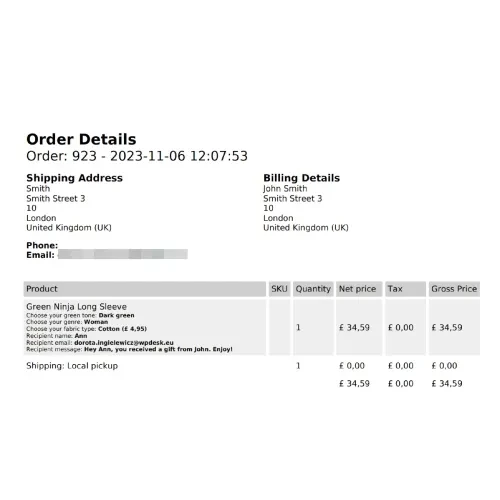
✔️ Print invoices, packing slips, and shipping/address labels ✔️ Create address labels from WooCommerce order information ✔️ Process multiple orders through bulk printing ✔️ Customize document layouts with store branding ✔️ Add business information and logos to printable documents ✔️ Designed for thermal and conventional printer workflows ✔️ Access printing functionality from the WooCommerce order area ✔️ Suitable for different shipping and fulfillment workflows ✔️ Simple configuration for everyday store management ✔️ Helps reduce repetitive order-document preparation 📖 Detailed Overview Processing a large number of WooCommerce orders can involve considerable paperwork. Print Orders and Address Labels for WooCommerce is designed to simplify this part of the fulfillment process by bringing commonly required printable documents closer to the order management workflow. Depending on the plugin configuration, administrators can generate documents such as invoices, packing slips, and address or shipping labels using information associated with WooCommerce orders.
Efficient Bulk Printing When multiple orders need to be prepared, printing documents individually can become time-consuming. The bulk-printing functionality can help administrators process several selected orders together, making it more suitable for stores handling regular or high-volume fulfillment. Customizable Print Layouts Store documents can be adjusted to better match a business's branding and operational requirements.
Where supported, administrators can include elements such as: Store logo Business name Contact information Customer details Order information Shipping information Product and quantity details Flexible Printer Workflows The plugin is designed to fit different printing environments, including setups using thermal printers or standard office printers. Actual print output and paper formatting can depend on the selected template, printer, browser, and local configuration. WooCommerce Order Workflow Rather than maintaining a completely separate order-printing system, the plugin is intended to work alongside the WooCommerce order-management process, allowing administrators to access printing functionality while handling orders.
Feature Print Orders & Address Labels Typical Basic Printing Tools Invoice Printing
✅ Supported
⚠️ May be limited Packing Slip Printing
✅ Supported
⚠️ May require an add-on Address/Shipping Labels
✅ Supported
⚠️ Availability varies Bulk Printing
✅ Available
❌ Often unavailable Template Customization
✅ Branding and layout options
⚠️ May be limited Thermal Printer Workflow
✅ Designed to support
⚠️ Depends on solution WooCommerce Order Integration
✅ Integrated workflow
⚠️ May require additional setup GPL Distribution
✅ Available under applicable GPL terms
❌ Licensing varies
Get Support
Please Sign In to contact our support.