🎃 Halloween Sale — Scary Good Deals, Up to 20% OFF! Don't be spooked by these prices — grab them before they disappear at midnight.
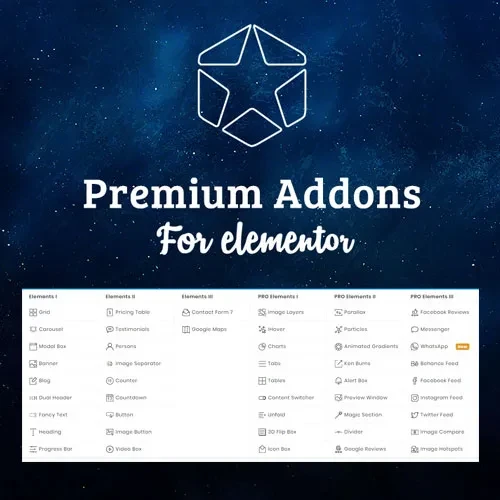
Premium Addons Pro for Elementor is an advanced extension toolkit designed to expand Elementor's website-building capabilities with additional widgets, creative design elements, templates, and customization options. It helps WordPress users create visually engaging websites by adding more design possibilities to their existing Elementor workflow. Whether you are developing a business website, online store, portfolio, landing page, blog, or agency website, Premium Addons Pro for Elementor provides additional tools to customize layouts and create interactive website sections. Its features include advanced widgets, dynamic content support, image effects, WooCommerce elements, popup components, and responsive design controls.
Premium Addons Pro for Elementor – Advanced WordPress Design Toolkit
Premium Addons Pro for Elementor is an advanced extension toolkit designed to expand Elementor's website-building capabilities with additional widgets, creative design elements, templates, and customization options. It helps WordPress users create visually engaging websites by adding more design possibilities to their existing Elementor workflow.
Whether you are developing a business website, online store, portfolio, landing page, blog, or agency website, Premium Addons Pro for Elementor provides additional tools to customize layouts and create interactive website sections. Its features include advanced widgets, dynamic content support, image effects, WooCommerce elements, popup components, and responsive design controls.
By extending Elementor with additional creative components, this toolkit can help designers and developers build distinctive website layouts while reducing the need for custom coding for many common design tasks.
Advanced Elementor Widgets – Expand your page-building options with additional widgets for creating customized website sections.
Creative Design Elements – Add visually appealing components to improve the presentation of website content.
Premium Templates – Use available pre-designed templates and layouts as a starting point for your projects.
Dynamic Content Support – Display supported dynamic information using compatible data sources and configuration options.
Advanced Image Effects – Enhance image presentation with available visual effects and styling options.
Interactive Content Elements – Create engaging website sections using supported interactive components.
WooCommerce Widgets – Customize supported online-store sections with additional WooCommerce design elements.
Popup and Modal Elements – Create supported popup or modal-style interfaces for displaying relevant content.
Responsive Controls – Adjust supported design settings for desktop, tablet, and mobile layouts.
Elementor Integration – Access additional design components within a compatible Elementor-based website workflow.
Elementor provides a visual website-building environment, while additional widget toolkits can extend the range of layouts and components available to designers. Premium Addons Pro for Elementor offers extra design options that can help users build more customized pages and improve the presentation of website content.
Access additional widgets to create different types of content sections without relying exclusively on Elementor's standard elements. The available widgets can help you build layouts suited to business websites, portfolios, service pages, and other WordPress projects.
Use creative elements and advanced styling options to develop website sections that match your brand identity. Customize supported visual properties to create a consistent appearance across different pages.
Pre-designed templates can provide a useful starting point when building new pages. Import or apply compatible layouts and customize their content, images, colors, and typography according to your requirements.
Dynamic content support can help present information from compatible data sources without manually entering every value into individual page elements. Available sources and display options depend on the widget, configuration, and installed integrations.
Use available image effects and interactive components to make selected website sections more engaging. Apply these features where they improve usability and support your overall design goals.
For websites using WooCommerce, compatible widgets can provide additional ways to present store content. The available elements depend on the installed version and supported WooCommerce configuration.
Supported popup and modal elements can help display announcements, additional information, or other relevant content. Configure them carefully to ensure that they remain accessible and do not interrupt the visitor experience unnecessarily.
Adjust supported settings for different screen sizes to create a consistent browsing experience across desktops, tablets, and smartphones. Always preview your finished pages on multiple devices before publishing.
Get Support
Please Sign In to contact our support.