What is Photolux – Photography Portfolio WordPress Theme?
Photolux – Photography Portfolio WordPress Theme (GPL)
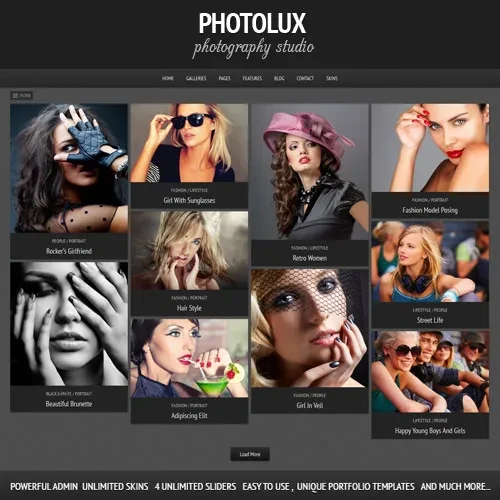
Photolux is an elegant and feature-rich photography portfolio WordPress theme created for photographers, photography studios, visual artists, designers, and creative professionals. It offers beautifully arranged layouts, versatile portfolio presentations, and flexible customization settings to help you build an impressive online showcase for your creative work.
Available through 5ivecode.com under the GPL license, Photolux includes lifetime free updates and limited email support.
💡 Key Features
Photography-Centered Design: A sophisticated visual style that keeps your photographs and creative projects at the center of attention.
Versatile Portfolio Layouts: Present your work using grid, masonry, and fullscreen portfolio arrangements.
Responsive & Retina-Ready Layouts: Ensures images and website elements display clearly across desktops, tablets, and mobile devices.
Flexible Theme Customization: Configure website appearance and functionality through the integrated theme options panel.
Lightbox Image Galleries: Display photographs in an enlarged viewing experience with built-in image protection options.
Shortcodes & Custom Widgets: Add creative content elements and extend page design possibilities.
SEO-Friendly Framework: Features a search-engine-conscious structure to support website discoverability.
Multilingual Support: Translation-ready functionality and WPML compatibility help you create websites for international audiences.
📖 Theme Overview
The Photolux WordPress Theme provides a dedicated platform for presenting photography and visual content in an attractive, organized format. Its minimalist appearance and gallery-focused features allow visitors to explore your work without unnecessary distractions.
Whether you specialize in wedding photography, fashion shoots, commercial projects, portraits, or artistic photography, Photolux gives you flexible tools to establish a professional online portfolio.
Its different gallery presentations make it easier to organize and display images according to your creative preferences. Combined with responsive layouts, lightbox viewing, and customizable design settings, the theme offers a practical solution for building a memorable photography website.
⚖️ Photolux vs. Other Photography WordPress Themes
Feature | Photolux Theme | Other Photography Themes |
|---|
Visual Design | Photography-oriented, minimalist appearance | May include distracting design elements |
Portfolio Options | Grid, masonry, and fullscreen layouts | Often limited to standard galleries |
Device Compatibility | Responsive and retina-ready presentation | Mobile and display support may vary |
Customization | Theme options, shortcodes, and widgets | May require additional customization tools |
Gallery Experience | Integrated lightbox functionality | Gallery features may vary |
GPL License | Flexible usage under GPL terms | Licensing conditions vary |
Updates | Lifetime free updates included | May require renewal payments |
⚙️ Installation Instructions
Sign in to your 5ivecode.com account and download the Photolux theme ZIP package.
Access your WordPress administration dashboard.
Navigate to Appearance > Themes > Add New.
Select Upload Theme and browse for the downloaded .zip file.
Click Install Now to begin the installation process.
Activate Photolux after WordPress finishes installing the theme.
Install any recommended plugins required for the theme's features.
If demo content is available, use the demo import option to configure a similar website layout.
Adjust portfolio arrangements, image galleries, typography, and other design preferences through the theme settings.