What is Photia – Photography Portfolio WordPress Theme?
Photia – Photography Portfolio WordPress Theme
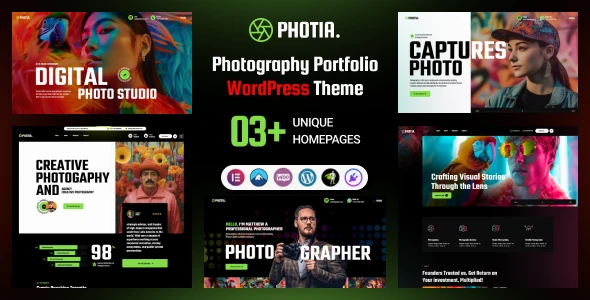
Photia – Photography Portfolio WordPress Theme is a beautifully designed WordPress theme created for photographers, digital artists, creative businesses, photography studios, and professionals working with visual content. Its stylish presentation and portfolio-focused layouts help you build an impressive website to display photographs, creative projects, and professional services.
Whether you specialize in wedding photography, portrait sessions, commercial photography, or artistic projects, Photia provides useful customization and presentation options to establish your online identity. With Elementor compatibility, responsive layouts, and WooCommerce integration, you can create a professional photography website that suits your business needs.
Distributed under the GPL license through 5ivecode.com, Photia comes with unlimited website usage, lifetime free updates, and limited email support.
✨ Key Features of Photia
Elegant Portfolio Layouts for Photographers and Creative Professionals
Elementor Page Builder Integration for Visual Customization
Multiple Gallery Styles and Image Presentation Options
Responsive Design with Retina Display Compatibility
Lightweight Structure for Improved Website Performance
SEO-Friendly Framework for Search Engine Visibility
WooCommerce Compatibility for Selling Photography Products and Services
GPL Licensing with Lifetime Free Updates
📘 Detailed Theme Overview
Photia provides a visually appealing platform for photographers and creative professionals who want to present their work through a polished and organized website. Its portfolio layouts, image galleries, and slideshow options allow you to display your photography collections in an attractive format while keeping the overall browsing experience simple and engaging.
The theme is designed with website speed and search engine compatibility in mind. Its support for popular WordPress plugins also gives you the flexibility to expand your website with additional functionality based on your requirements.
Photia also works with WooCommerce, making it possible to create an online photography store. You can use this integration to offer digital photo downloads, printed photographs, and photography-related services directly through your website.
📊 Photia vs. Conventional Photography Portfolio Themes
Features | Photia Theme | Conventional Portfolio Themes |
|---|
License | GPL-Based Distribution | Licensing Conditions Vary |
Updates | Lifetime Free Updates | Renewal May Be Required |
Portfolio Presentation | Modern Photography Layouts | Standard Portfolio Designs |
Website Performance | Performance-Focused Structure | Performance Varies |
Customization | Elementor Compatibility | Editing Options Vary |
SEO Structure | SEO-Conscious Design | SEO Features Vary |
⚙️ Photia Theme Installation Instructions
Download the Photia WordPress theme ZIP package from 5ivecode.com.
Sign in to your WordPress administrator account.
Navigate to Appearance → Themes → Add New.
Select Upload Theme and browse for the Photia ZIP package.
Press Install Now to upload and install the theme.
Once installation is complete, click Activate.
Install any recommended or required plugins if requested.
Import the available demo content, if provided, to get your photography website started more quickly.