Exclusive Coupon — Use Code SAVE10 for Instant Savings! Apply at checkout for your special discount. Limited uses — grab it while you can.
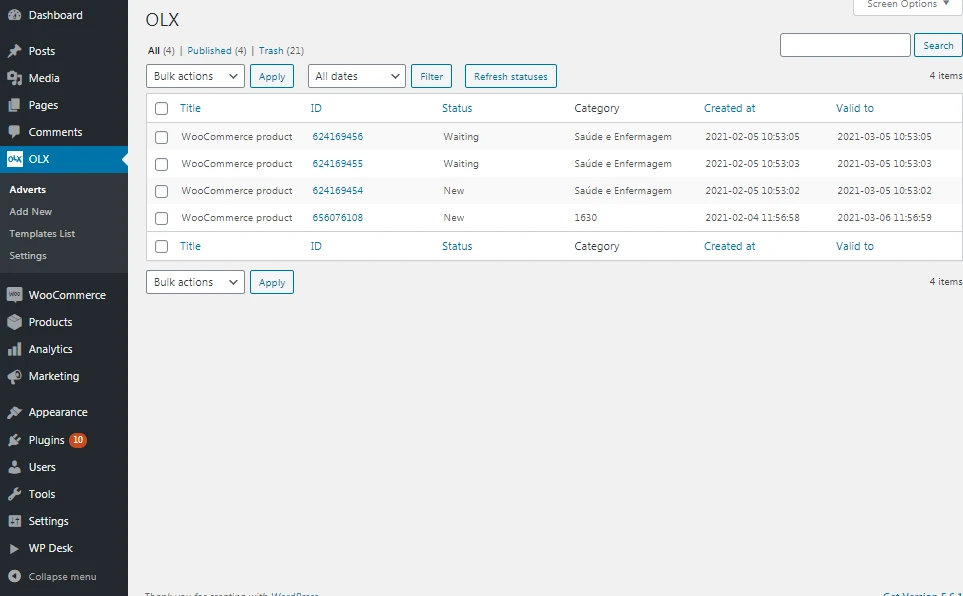
OLX WooCommerce is designed to help transform a WordPress website powered by WooCommerce into a classified listings and marketplace platform. It provides tools for allowing users or vendors to publish listings, manage their ads, and offer products or services through a WooCommerce-based website. The plugin can be useful for creating an OLX-style classifieds website, community marketplace, local listing portal, service directory, rental platform, or multi-vendor-style marketplace, depending on the available features and configuration of your installation.
OLX WooCommerce
OLX WooCommerce is designed to help transform a WordPress website powered by WooCommerce into a classified listings and marketplace platform. It provides tools for allowing users or vendors to publish listings, manage their ads, and offer products or services through a WooCommerce-based website.
The plugin can be useful for creating an OLX-style classifieds website, community marketplace, local listing portal, service directory, rental platform, or multi-vendor-style marketplace, depending on the available features and configuration of your installation.
With front-end listing management, search filters, user dashboards, and monetization options, you can build a platform where users have more control over their own listings while the site administrator manages the overall marketplace.
The plugin is available through 5ivecode.com under the GPL license, with lifetime free updates and limited email support, subject to the applicable licensing terms.
✨ Key Features
Create an OLX-style classifieds marketplace using WordPress and WooCommerce.
Allow registered users to submit listings from the front end.
Let users create, edit, and manage their own advertisements.
Provide user dashboards for managing listings and account information.
Offer monetization options such as paid listings, featured advertisements, or membership-based access, where supported.
Help visitors search listings using categories, locations, prices, and other available filters.
Support different listing scenarios, including products, services, rentals, and community advertisements.
Connect marketplace transactions with WooCommerce's available checkout and payment functionality.
Provide a responsive experience for users accessing the marketplace from mobile devices.
Use supported shortcodes, widgets, or page elements to build marketplace layouts.
Compatible with popular WordPress page-building workflows, including Elementor where supported.
Suitable for entrepreneurs, local communities, niche marketplaces, and classified listing websites.
📖 Detailed Overview
Building a classified website from the ground up can require several different components, including listing submission, user account management, search functionality, monetization, and payment processing.
OLX WooCommerce brings these concepts together within a WordPress and WooCommerce environment, giving you a foundation for creating a user-driven classifieds marketplace.
Instead of requiring administrators to manually create every listing, users can submit their own advertisements through the front end when the appropriate permissions and settings are enabled. They can then manage their listings through the available user dashboard.
🏷️ User Listing Management
Users can create advertisements and manage their existing listings without needing direct access to the WordPress administration area.
Depending on the plugin configuration, your marketplace can be structured around:
Products for sale
Local classified advertisements
Professional services
Rental listings
Community listings
Business advertisements
Niche marketplace categories
💰 Marketplace Monetization
A classified website can generate revenue by offering premium listing options. Where supported, you can configure options such as:
Paid advertisements
Featured listings
Premium listing packages
Membership plans
Promotional placement
This allows the website owner to choose a monetization strategy that fits the marketplace's business model.
🔎 Search and Discovery
A large classifieds website needs an effective way for visitors to locate relevant advertisements. Available filtering options can help shoppers narrow listings according to criteria such as category, location, price, and other supported fields.
This can make it easier to organize large numbers of listings and improve the browsing experience.
👤 User Dashboard
A dedicated user area allows marketplace participants to manage their listings and account information. This is particularly useful when multiple users are publishing advertisements on the same website.
🛒 WooCommerce Integration
Because the solution works alongside WooCommerce, supported marketplace transactions can take advantage of WooCommerce's existing order and payment infrastructure.
Actual payment behavior depends on the configured WooCommerce payment gateways, plugin settings, and other components installed on your website.
Get Support
Please Sign In to contact our support.