What is MyThemeShop Purple WordPress Theme?
MyThemeShop Purple WordPress Theme – GPL Download
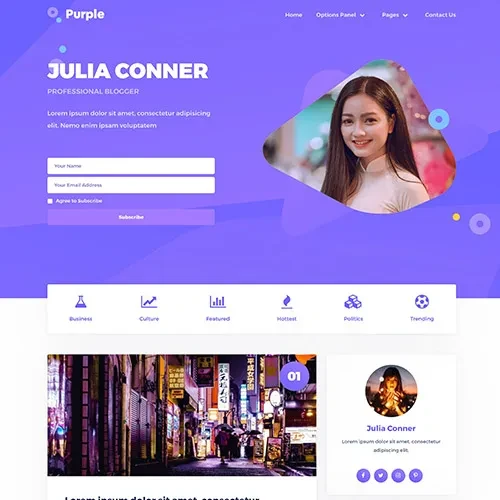
MyThemeShop Purple is a stylish and versatile WordPress theme designed for bloggers, independent publishers, creative professionals, and personal website owners. Its colorful appearance, flexible design settings, and content-friendly structure make it easy to build a distinctive website that reflects your personality or brand.
Whether you want to publish articles, share creative projects, or develop a personal portfolio, Purple provides an attractive platform for presenting your content. The GPL version is available through 5ivecode.com, with lifetime free updates and limited email support.
Key Features
🎨 Eye-Catching Visual Design – Features a vibrant appearance that helps blogs, portfolios, and personal websites establish a distinctive identity.
📱 Responsive Across Devices – Adjusts the website layout to provide a consistent experience on smartphones, tablets, and desktop computers.
⚡ Speed-Conscious Structure – Designed to support efficient page loading and smooth website navigation.
🖌️ Flexible Design Customization – Personalize supported colors, typography, and layout settings through the WordPress Customizer.
🔍 SEO-Friendly Foundation – Includes an SEO-conscious structure to support search engine optimization efforts.
🧩 Helpful Built-In Widgets – Use available widgets such as recent posts and social media feeds to improve content discovery and visitor engagement.
🔄 Lifetime Free Updates – Receive ongoing theme updates without recurring renewal charges through 5ivecode.com.
Detailed Theme Overview
Give your website a distinctive appearance with MyThemeShop Purple, a WordPress theme that combines colorful styling with practical publishing features. Its visually engaging design makes it suitable for personal blogs, creative portfolios, online publications, and content-focused websites.
Purple allows you to present articles and creative work in an organized manner while offering customization settings to adapt the website to your preferred branding. You can adjust supported visual elements, including colors, fonts, and layouts, through the WordPress Customizer without requiring advanced programming knowledge.
Its responsive presentation helps visitors explore your content from different devices, while the available widgets provide additional opportunities to highlight recent publications and social media activity.
For bloggers and creators looking for a combination of expressive design and convenient website management, Purple offers a useful WordPress starting point.
MyThemeShop Purple vs Other Blog Themes
Feature | MyThemeShop Purple | Typical Blog Themes |
|---|
Visual Appearance | Colorful and distinctive styling | Often conventional layouts |
Responsive Layout | Mobile-friendly presentation | Device compatibility varies |
Design Settings | Flexible customization options | Options depend on the theme |
SEO Structure | SEO-conscious foundation | Optimization quality varies |
Widget Support | Recent posts and social feeds | Widget availability differs |
Updates | Lifetime free updates through 5ivecode.com | Renewal policies vary |
Installation Instructions
Download the MyThemeShop Purple WordPress Theme ZIP package from 5ivecode.com.
Access your WordPress administration dashboard.
Navigate to Appearance → Themes → Add New → Upload Theme.
Browse your computer and select the downloaded ZIP file.
Click Install Now to upload and install the theme.
Once installation is complete, click Activate.
Configure your homepage and blog presentation settings.
Personalize available colors, typography, layouts, and widgets through the WordPress Customizer.