Exclusive Coupon — Use Code SAVE10 for Instant Savings! Apply at checkout for your special discount. Limited uses — grab it while you can.
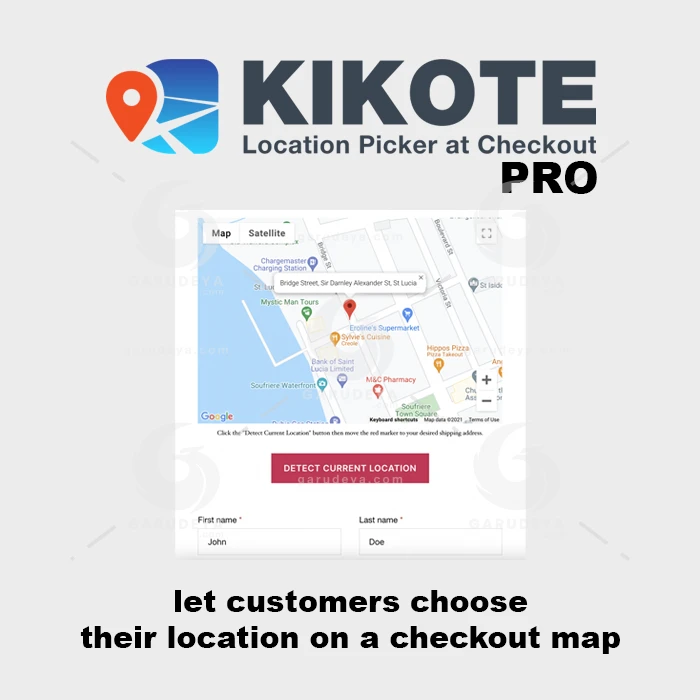
Kikote PRO is a WooCommerce plugin designed to make checkout location selection easier and more precise. It adds an interactive map-based location picker to the checkout process, allowing customers to identify their delivery address, pickup point, or preferred location visually. By combining map selection with address autocomplete and WooCommerce checkout integration, Kikote PRO can help businesses reduce address-entry errors and provide customers with a more convenient ordering experience.
Kikote PRO – WooCommerce Checkout Location Picker (GPL Licensed) Kikote PRO is a WooCommerce plugin designed to make checkout location selection easier and more precise. It adds an interactive map-based location picker to the checkout process, allowing customers to identify their delivery address, pickup point, or preferred location visually. By combining map selection with address autocomplete and WooCommerce checkout integration, Kikote PRO can help businesses reduce address-entry errors and provide customers with a more convenient ordering experience. 🚀 Key Features Interactive Map Location Picker – Allow customers to choose their delivery or pickup location directly from an interactive map. Multiple Location Options – Configure the system for delivery addresses, collection points, or other location-based requirements. Custom Map Configuration – Adjust map zoom, starting position, markers, and other location-display settings. Address Autocomplete – Use address suggestions to make location entry faster and more convenient. WooCommerce Checkout Integration – Add location selection functionality directly to the WooCommerce checkout workflow. Mobile-Friendly Interface – Provide a responsive map experience for smartphones, tablets, and desktop users. Administrative Controls – Manage location settings, pickup locations, and related configuration from the WordPress dashboard. Shipping Method Compatibility – Designed to work alongside WooCommerce shipping and delivery configurations. Delivery Location Accuracy – Give customers a visual way to identify their preferred destination. Performance-Focused Structure – Designed to add location functionality without unnecessarily complicating the checkout experience. 📖 Detailed Overview Kikote PRO provides a practical way to introduce map-based location selection into a WooCommerce store. Traditional checkout forms require customers to manually enter addresses, which can sometimes result in incomplete or inaccurate location information. With a map-based picker, customers can identify a location visually and provide additional location information during checkout. This can be particularly useful for restaurants, local delivery businesses, grocery stores, service providers, pickup businesses, and other WooCommerce websites where accurate location details are important. The plugin also provides configurable map options and address suggestions, helping store administrators create a checkout experience that matches their delivery or pickup workflow. ⚖️ Kikote PRO vs Standard Checkout Location Entry Feature Kikote PRO Standard WooCommerce Checkout Map Location Selection ✔ Interactive map ❌ Not included by default Address Entry ✔ Map and address options ✔ Manual form entry Location Accuracy ✔ Visual location selection ⚠ Depends on customer input Pickup Locations ✔ Configurable ⚠ Requires additional setup Mobile Experience ✔ Responsive map interface ✔ Standard responsive form Admin Controls ✔ Location configuration ⚠ Basic checkout settings Shipping Integration ✔ Designed for WooCommerce ✔ Standard shipping support 📦 What’s Included Kikote PRO plugin ZIP package Interactive checkout location picker Map configuration options Location and pickup settings Address autocomplete functionality WooCommerce checkout integration Responsive location-selection interface Administrative configuration options Note: Exact features, updates, documentation, and support may vary according to the specific distribution package and applicable licensing terms. 🛠️ Installation Guide Download the Kikote PRO – Location Picker for WooCommerce ZIP package from your 5ivecode.com account. Log in to your WordPress administration dashboard. Navigate to Plugins → Add New → Upload Plugin. Select the Kikote PRO ZIP file. Click Install Now. Activate the plugin after installation. Open the plugin's WooCommerce settings. Configure map preferences, default locations, markers, and location options. Configure delivery or pickup requirements according to your store. Complete a test checkout to verify the location picker and order information.
Get Support
Please Sign In to contact our support.