Exclusive Coupon — Use Code SAVE10 for Instant Savings! Apply at checkout for your special discount. Limited uses — grab it while you can.
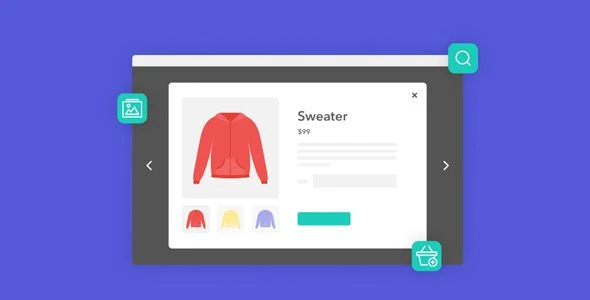
Iconic WooCommerce Quickview adds a convenient product-preview experience to WooCommerce stores by allowing shoppers to view important product information inside a quickview popup without navigating away from the current catalog page. Customers can preview details such as product images, descriptions, prices, and available variations, and, where supported by the product configuration, add an item to the cart directly from the quickview interface.
Iconic WooCommerce Quickview Iconic WooCommerce Quickview adds a convenient product-preview experience to WooCommerce stores by allowing shoppers to view important product information inside a quickview popup without navigating away from the current catalog page. Customers can preview details such as product images, descriptions, prices, and available variations, and, where supported by the product configuration, add an item to the cart directly from the quickview interface. This can be especially useful for fashion stores, electronics shops, accessories, furniture catalogs, and other WooCommerce stores with visually rich product listings. Feature Highlights 👁️ Quick Product Previews – Let shoppers inspect product information without leaving the shop or archive page. 🛒 Add to Cart from Quickview – Provide supported add-to-cart functionality directly inside the popup. 🎨 Customizable Quickview Modal – Configure available popup presentation options for product images, prices, descriptions, and other information. 🔄 Variation Selection – Allow customers to work with supported product variations from the quickview interface. 📱 Responsive Layout – Designed for desktop, tablet, and mobile storefronts. ⚡ AJAX-Based Interactions – Uses AJAX functionality where supported to help provide a smoother quickview experience. 🛠 WooCommerce Integration – Designed to work with WooCommerce product catalog layouts. 🔒 GPL Licensing – GPL-based usage for personal and client projects, subject to applicable licensing terms. 🔄 Lifetime Updates – Includes lifetime updates and limited email support according to the package terms from 5ivecode.com. Detailed Overview Browsing a large WooCommerce catalog can require customers to repeatedly open individual product pages just to check basic information. Iconic WooCommerce Quickview provides an alternative by displaying selected product details in a popup directly from compatible product listings. Instead of navigating away from the catalog, shoppers can use the quickview interface to inspect product information and, where supported, select options and add products to their cart. Quick Product Information The quickview popup can provide access to important product information such as: Product images Product title Product description Product price Product availability information where supported Product variations where supported Add-to-cart controls The exact information displayed depends on the plugin configuration, WooCommerce product type, and theme implementation. Add Products Directly from Quickview For supported products, customers can add an item to their cart directly from the popup. This can be useful when shoppers already have enough information to make a purchasing decision and do not need to open the complete product page. For variable products, the available options should be tested carefully to ensure customers can select the required variation before adding the product to the cart. Product Variation Support A quickview system becomes more useful when it can handle products with selectable options. Depending on the plugin version and product configuration, customers may be able to interact with supported: Sizes Colors Product attributes Variations Other WooCommerce product options Always test variable products with your theme and active WooCommerce extensions before deploying the quickview system on a production store. Customizable Popup Design The quickview modal can be configured using the available design settings. Depending on the installed version, customization may include options related to: Popup layout Width or sizing Product-image presentation Colors Typography Spacing Buttons Overlay Close controls Other styling elements The exact customization controls should be verified against your plugin version. AJAX-Powered Experience The plugin uses AJAX-based functionality for supported quickview interactions, which can help avoid unnecessary full-page navigation in applicable workflows. Actual response time depends on factors such as: Web hosting Server response time Product data Image sizes Number of plugins Theme code Caching Network conditions WooCommerce configuration Therefore, AJAX functionality should not be interpreted as a guarantee of a specific loading speed. Responsive Shopping The quickview interface is designed for responsive storefronts and can be used across desktop, tablet, and mobile environments. Because desktop users typically interact with product listings using a mouse while mobile visitors use touch controls, test the popup on multiple screen sizes to ensure buttons, variations, images, and close controls remain accessible. Ideal Use Cases 👗 Fashion & Clothing Stores Quickly preview clothing products, images, prices, sizes, and available options from category pages. 💻 Electronics Stores Allow customers to inspect key product information before opening the complete product page. 👜 Accessories Shops Provide a faster way to browse visually driven product catalogs. 🏠 Furniture Stores Give customers quick access to product images, descriptions, pricing, and supported options. 🛍 Large Product Catalogs Quickview can be useful when shoppers need to inspect many products without repeatedly navigating between catalog and product pages.
Get Support
Please Sign In to contact our support.