🎃 Halloween Sale — Scary Good Deals, Up to 20% OFF! Don't be spooked by these prices — grab them before they disappear at midnight.
Google Maps – WordPress Map Plugin is a mapping solution that helps website owners integrate interactive maps and location-based information into their WordPress websites. It allows businesses, service providers, and organizations to present physical locations, guide visitors, and make important address information easier to find. Whether you operate a business website, an online directory, a real estate platform, a travel website, or a service-based business, interactive maps can help visitors understand where your locations are and how to reach them. With features such as location markers, information windows, address search, directions, and customizable map layouts, this type of plugin can improve the usefulness of location-focused pages.
Google Maps – WordPress Map Plugin for Interactive Maps and Locations
Google Maps – WordPress Map Plugin is a mapping solution that helps website owners integrate interactive maps and location-based information into their WordPress websites. It allows businesses, service providers, and organizations to present physical locations, guide visitors, and make important address information easier to find.
Whether you operate a business website, an online directory, a real estate platform, a travel website, or a service-based business, interactive maps can help visitors understand where your locations are and how to reach them. With features such as location markers, information windows, address search, directions, and customizable map layouts, this type of plugin can improve the usefulness of location-focused pages.
By adding Google Maps to your WordPress website, you can provide visitors with a convenient way to explore locations and access relevant geographic information.
Google Maps Integration: Display Google Maps on supported WordPress pages.
Interactive Map Display: Let visitors explore maps through supported interactive controls.
Location Marker Management: Identify important places with map markers.
Multiple Location Support: Display several locations on a map where supported.
Custom Map Markers: Personalize marker appearances using available options.
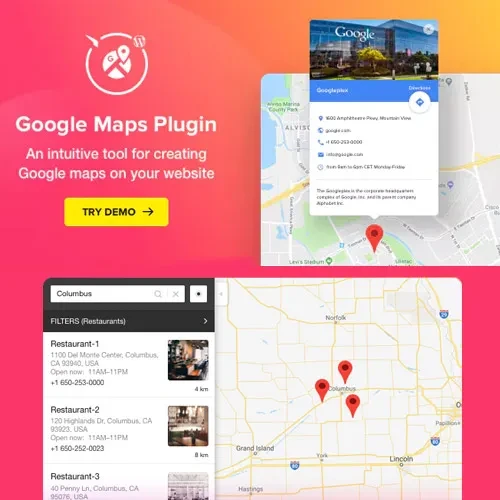
Location Information Windows: Present additional details when visitors select a marker.
Address and Location Search: Help visitors find specific locations using supported search functionality.
Directions Support: Help visitors access directions to selected destinations.
Map Layout Customization: Adjust map presentation to suit your website design.
Responsive Map Design: Display maps in layouts intended to work across different screen sizes.
Integrate Google Maps into your WordPress website to display geographic information directly within your content. This can be useful for contact pages, branch directories, store locators, office listings, and service-area pages.
Google Maps API access, configuration, and billing requirements may depend on the integration method and the features you use.
Give visitors an interactive way to explore displayed locations. Depending on the implementation, visitors may be able to zoom, pan, and select map markers to discover relevant location information.
Interactive maps can make location details more accessible than displaying addresses alone.
Add markers to identify important destinations, such as business offices, retail stores, service centers, hotels, or property listings. Well-organized markers help visitors recognize the locations that matter to them.
Display multiple destinations on a map where supported by the plugin. This is particularly useful for businesses with several branches or organizations that need to showcase multiple offices, venues, or service locations.
For larger location directories, check whether the plugin supports marker grouping or clustering.
Use available marker customization options to create a map that matches your website's presentation. Different marker designs can help distinguish branches, categories, services, or other location types.
Check the plugin documentation for the supported marker formats and customization settings.
Provide additional information when visitors select a map marker. Depending on the plugin's capabilities, an information window may display a location name, address, contact details, or a link to a relevant page.
This allows visitors to explore locations without leaving the map immediately.
Help visitors locate a specific place using available search functionality. Address and location search can be especially useful for store locators, directories, and websites that display many destinations.
The availability of address autocomplete, geocoding, or advanced search depends on the plugin implementation and its configuration.
Get Support
Please Sign In to contact our support.