🎃 Halloween Sale — Scary Good Deals, Up to 20% OFF! Don't be spooked by these prices — grab them before they disappear at midnight.
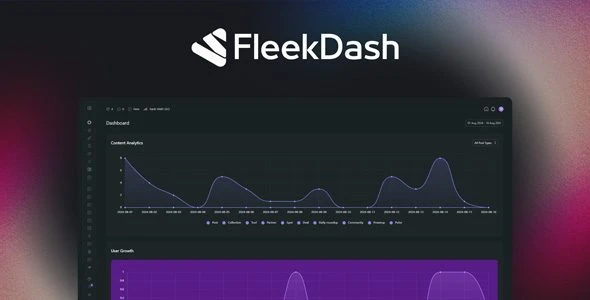
FleekDash is a modern WordPress admin workspace plugin that transforms the default dashboard into a faster, cleaner, and more productive environment. Instead of replacing WordPress core, it enhances the existing admin experience with multitasking windows, an organized workspace, AI-powered tools, and visual business insights. The GPL licensed version lets you install FleekDash on unlimited personal and client websites without activation restrictions, making it an excellent solution for developers, agencies, freelancers, and business owners.
FleekDash – WordPress Admin Workspace Plugin (GPL Licensed) FleekDash is a modern WordPress admin workspace plugin that transforms the default dashboard into a faster, cleaner, and more productive environment. Instead of replacing WordPress core, it enhances the existing admin experience with multitasking windows, an organized workspace, AI-powered tools, and visual business insights. The GPL licensed version lets you install FleekDash on unlimited personal and client websites without activation restrictions, making it an excellent solution for developers, agencies, freelancers, and business owners. Key Features ✅ Modern WordPress Admin Workspace ✅ Non-Destructive Dashboard Enhancement ✅ Multitasking Window Interface ✅ Faster Navigation & Workflow ✅ AI-Powered Productivity Tools ✅ Visual Sales & Business Dashboard ✅ Organized Workspace Layout ✅ Responsive Admin Interface ✅ Lightweight & Performance Optimized ✅ Developer-Friendly Design ✅ Compatible with Popular WordPress Plugins ✅ Unlimited Website Usage (GPL) ✅ Lifetime Free Updates Detailed Overview FleekDash reimagines the WordPress administration experience by introducing a modern workspace while preserving full compatibility with the standard WordPress backend. Rather than modifying WordPress core functionality, it overlays an intuitive interface that helps users manage multiple tasks more efficiently. The plugin allows administrators to work with multiple windows simultaneously, reducing unnecessary page switching and making content management significantly faster. Built-in AI-assisted tools help streamline routine workflows, while visual dashboards provide quick insights into important business and website metrics. Designed for agencies, freelancers, WooCommerce store owners, and content creators, FleekDash improves productivity through a cleaner interface, smarter organization, and a responsive design that works smoothly across desktop and mobile devices. Comparison Table Feature FleekDash Standard WordPress Dashboard Modern Workspace Interface ✅ Yes ❌ Traditional Layout Multitasking Windows ✅ Built-In ❌ Not Available AI Productivity Features ✅ Included ❌ None Visual Business Dashboard ✅ Yes ⚠ Basic Widgets Faster Navigation ✅ Optimized ⚠ Standard Navigation Responsive Admin UI ✅ Yes ✅ Yes Core WordPress Compatible ✅ Fully Compatible ✅ Yes GPL License ✅ Unlimited Usage ❌ Varies Installation Guide Download the FleekDash plugin ZIP file. Log in to your WordPress dashboard. Navigate to Plugins → Add New → Upload Plugin. Upload the ZIP file and click Install Now. Activate the plugin. Open the FleekDash settings panel. Configure your workspace layout, AI tools, and dashboard preferences. Start managing your website with the enhanced admin workspace. Licensing Information FleekDash is distributed under the GNU General Public License (GPL). Your download includes: Original GPL Licensed Plugin Unlimited Personal & Client Website Usage No License Activation Required Lifetime Free Updates Verified Clean Files Limited Email Support Frequently Asked Questions Does FleekDash replace the WordPress dashboard? No. FleekDash enhances the existing WordPress admin interface while keeping the original backend intact. Can I manage multiple tasks at once? Yes. The multitasking workspace allows you to work with multiple admin windows simultaneously for improved productivity. Does it include AI features? Yes. FleekDash includes AI-powered tools designed to simplify administrative tasks and improve workflow efficiency. Is it compatible with WooCommerce? Yes. FleekDash is designed to work alongside WooCommerce and many popular WordPress plugins. Can I install it on multiple websites? Yes. The GPL license allows unlimited installations on both personal and client websites. Why Choose FleekDash? FleekDash provides a modern approach to WordPress administration by combining a clean workspace, multitasking capabilities, AI-powered productivity features, and visual business insights into a single dashboard. Instead of changing how WordPress works, it enhances the admin experience with a faster and more organized interface. Whether you're managing client websites, running an online store, publishing content, or maintaining multiple WordPress projects, FleekDash helps you work more efficiently while keeping your familiar WordPress backend fully intact.
Get Support
Please Sign In to contact our support.