🎃 Halloween Sale — Scary Good Deals, Up to 20% OFF! Don't be spooked by these prices — grab them before they disappear at midnight.
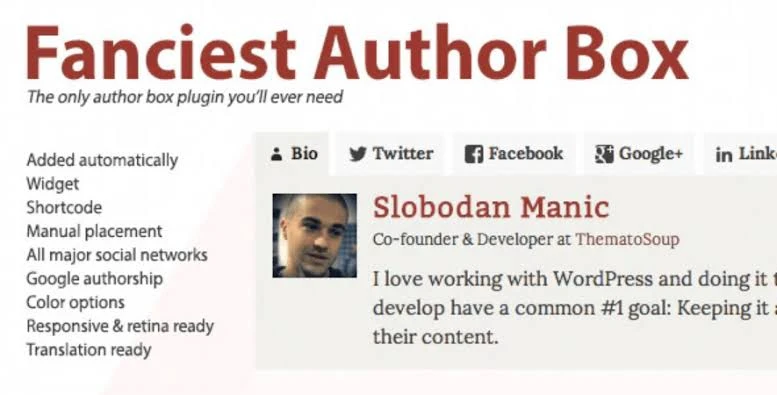
Fanciest Author Box is a WordPress plugin designed to create attractive, customizable author profiles for posts, pages, and supported custom post types. It helps website owners display author biographies, profile details, social media links, and recent articles in a professional layout. Whether you manage a personal blog, online magazine, business website, or multi-author publication, Fanciest Author Box can help highlight content creators, establish author credibility, and encourage visitors to discover more articles.
Fanciest Author Box GPL Plugin – Customizable WordPress Author Profiles
Fanciest Author Box is a WordPress plugin designed to create attractive, customizable author profiles for posts, pages, and supported custom post types. It helps website owners display author biographies, profile details, social media links, and recent articles in a professional layout.
Whether you manage a personal blog, online magazine, business website, or multi-author publication, Fanciest Author Box can help highlight content creators, establish author credibility, and encourage visitors to discover more articles.
Available through 5ivecode.com, with updates and support subject to the provider’s terms.
Customizable Author Profiles – Display author names, biographies, avatars, website links, and professional titles.
Social Media Integration – Add profile links for platforms such as X/Twitter, LinkedIn, Facebook, Instagram, GitHub, and other supported networks.
Recent Articles Tab – Showcase an author's latest posts to help visitors explore additional content.
Flexible Display Settings – Configure author box placement above or below content, or use manual placement where supported.
Editor Compatibility – Integrate author information into WordPress content and supported page-building workflows.
Appearance Customization – Adjust available layouts, colors, skins, and typography to complement your website design.
Custom Post Type Support – Display author details on supported content types, including portfolios, documentation, and products.
GPL Licensing – Use, modify, and distribute the plugin according to the applicable GNU General Public License terms.
Fanciest Author Box helps transform a simple author byline into a more informative and visually appealing profile section. By displaying author information, social links, and optional recent-post tabs, it gives readers additional context about the people creating your content.
Website administrators can configure the overall appearance and, where supported, adjust placement for individual posts. This flexibility makes the plugin useful for multi-author blogs, digital magazines, specialist publications, agencies, and other content-focused websites.
Providing clear author information can also support your website's credibility and demonstrate who is responsible for publishing its content.
Feature | Fanciest Author Box | Basic Author Box |
|---|---|---|
Profile Layouts and Styling | Multiple customization options | Often limited |
Social Media Links | Supports various networks | May offer fewer options |
Recent Posts Tab | Available as a feature | May not be included |
Placement Controls | Flexible options, depending on configuration | Often fixed |
Custom Post Types | Supported where compatible | Varies by plugin |
Site Usage | Subject to GPL terms | Depends on the license |
Obtain the Fanciest Author Box plugin package from 5ivecode.com.
Sign in to your WordPress dashboard.
Navigate to Plugins → Add New → Upload Plugin.
Select the plugin ZIP file and click Install Now.
After installation, select Activate.
Open the plugin settings, if available, to configure the layout, colors, and display position.
Update author profiles under Users → Profile or the corresponding user profile screen to add biographies and social links.
Save your settings and preview a post to check the author box's appearance and placement.
Note: Menu names and configuration options may differ depending on the plugin version.
Get Support
Please Sign In to contact our support.