Exclusive Coupon — Use Code SAVE10 for Instant Savings! Apply at checkout for your special discount. Limited uses — grab it while you can.
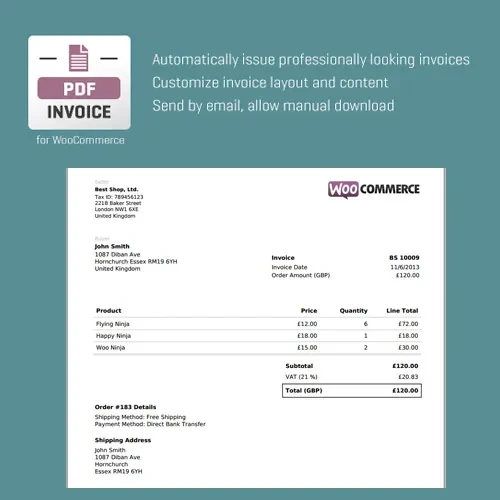
WooCommerce PDF Invoice automates the creation of PDF invoices for WooCommerce orders, giving store owners a convenient way to generate, manage, and deliver order documents to customers. Create branded invoice documents, attach PDFs to customer emails, provide downloadable invoices through account and order areas, and configure invoice information for different store requirements. The plugin can be useful for businesses that need a more organized invoicing workflow within WooCommerce. The GPL-licensed distribution is available from 5ivecode.com with lifetime updates and limited email support according to the applicable distribution terms.
WooCommerce PDF Invoice – CodeCanyon PDF Invoice Plugin
WooCommerce PDF Invoice automates the creation of PDF invoices for WooCommerce orders, giving store owners a convenient way to generate, manage, and deliver order documents to customers.
Create branded invoice documents, attach PDFs to customer emails, provide downloadable invoices through account and order areas, and configure invoice information for different store requirements. The plugin can be useful for businesses that need a more organized invoicing workflow within WooCommerce.
The GPL-licensed distribution is available from 5ivecode.com with lifetime updates and limited email support according to the applicable distribution terms.
Automatically generate PDF invoices from WooCommerce orders
Attach invoice PDFs to configured customer emails
Customize invoice layouts and store branding
Add business details, logos, and invoice information
Allow customers to access and download their invoices
Provide administrators with invoice access from WooCommerce order management
Support tax and VAT-related invoice information
Suitable for multilingual and multi-currency WooCommerce environments
Use the GPL distribution across personal and client websites according to applicable GPL terms
Receive lifetime updates through the supplied GPL distribution
Managing invoices manually for every WooCommerce order can create additional administrative work. WooCommerce PDF Invoice provides an automated workflow for generating PDF invoice documents from store orders.
Once configured, the plugin can create invoice PDFs using your selected settings and attach them to applicable customer emails. This reduces the need to manually prepare and send an invoice after each purchase.
Store owners can customize invoice presentation to include business branding, logos, order information, customer details, and relevant tax or VAT data. Customers can also access invoice documents through supported account or order areas, while administrators can retrieve invoices from the store's order-management interface.
For stores serving customers in different regions, multilingual and multi-currency capabilities can make the invoice workflow more adaptable. However, the exact tax and legal requirements for an invoice depend on the merchant's jurisdiction and business circumstances.
Feature | WooCommerce PDF Invoice | Manual Invoice Process |
|---|---|---|
PDF Generation | Automated from WooCommerce orders | Usually created manually |
Customer Email Delivery | Can attach invoices to configured emails | Requires manual handling |
Invoice Templates | Customizable | Depends on the document system used |
Customer Downloads | Available through supported WooCommerce areas | Usually requires separate delivery |
Admin Access | Invoice documents available for order management | Files must be stored and managed manually |
Tax & VAT Information | Supports relevant invoice fields | Must be entered manually |
Branding | Supports customized invoice presentation | Depends on the invoice template |
Multi-Currency Environment | Designed to support multi-currency invoice workflows | Requires manual handling |
Updates | Lifetime updates with the supplied GPL distribution | Not applicable |
Obtain the WooCommerce PDF Invoice GPL Plugin from 5ivecode.com.
Log in to your WordPress administrator dashboard.
Navigate to Plugins → Add New → Upload Plugin.
Select the downloaded ZIP package.
Click Install Now.
Activate the plugin after installation.
Open the plugin's invoice settings under the relevant WooCommerce PDF Invoice configuration area.
Add your business information, logo, invoice details, and preferred formatting options.
Configure the customer email attachment settings.
Create a test WooCommerce order to verify PDF generation and delivery.
WooCommerce PDF Invoice is distributed under the GNU General Public License (GPL).
A GPL-licensed distribution may be used on personal and client websites according to the applicable GPL terms. Review the license and any relevant third-party conditions before deployment.
Important: This is a GPL distribution and should not be represented as the official distribution from the original CodeCanyon developer. 5ivecode.com provides GPL-licensed software packages with lifetime updates and limited email support according to its distribution terms.
Tax and invoice requirements vary between countries and jurisdictions. The plugin's invoice functionality does not by itself guarantee that a store's invoices satisfy every applicable legal or tax requirement. Store owners should configure invoice information according to their local regulations and, where appropriate, obtain professional tax advice.
Get Support
Please Sign In to contact our support.