🎃 Halloween Sale — Scary Good Deals, Up to 20% OFF! Don't be spooked by these prices — grab them before they disappear at midnight.
Accordion FAQ WordPress Plugin provides a convenient way to build organized, collapsible frequently asked questions (FAQs) on your WordPress website. Its accordion-style presentation lets visitors expand questions to read answers, helping keep pages tidy and making important information easier to navigate. Whether you run an online store, business website, blog, membership platform, or service-based website, an FAQ plugin can help address common customer questions, improve content accessibility, and make support information easier to find.
Accordion FAQ WordPress Plugin (GPL) – Create Interactive FAQ Sections
Accordion FAQ WordPress Plugin provides a convenient way to build organized, collapsible frequently asked questions (FAQs) on your WordPress website. Its accordion-style presentation lets visitors expand questions to read answers, helping keep pages tidy and making important information easier to navigate.
Whether you run an online store, business website, blog, membership platform, or service-based website, an FAQ plugin can help address common customer questions, improve content accessibility, and make support information easier to find.
The plugin is described as GPL licensed. Updates and email support through 5ivecode.com are subject to the provider's current terms.
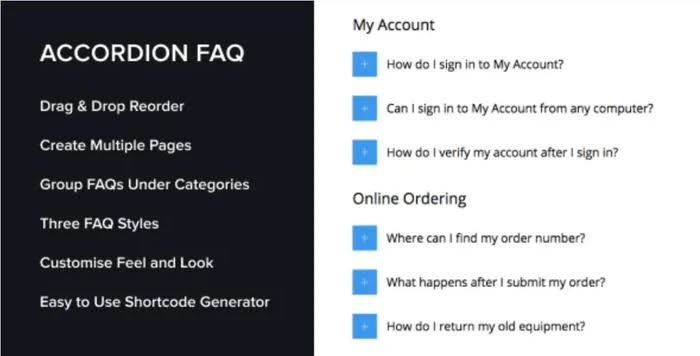
Collapsible FAQ Sections – Organize questions and answers into expandable sections.
Drag-and-Drop Ordering – Arrange FAQ items in a preferred order where supported.
Multiple FAQs and Categories – Group questions by topic, product, or website section.
Shortcode Integration – Place FAQ content in supported WordPress pages, posts, and content areas.
Customizable Appearance – Adjust available colors, icons, and styling to complement your website.
Responsive Layout – Present FAQ content across desktop, tablet, and mobile screens, subject to theme compatibility.
Page Builder Integration – Use available shortcodes, blocks, or widgets with compatible page-building tools.
GPL Licensing – Use and modify the plugin according to the applicable GNU General Public License terms.
The Accordion FAQ WordPress Plugin helps website owners present answers in a compact, interactive format without requiring visitors to scroll through long blocks of text. Users can select a question to reveal its answer, making it easier to locate relevant information.
You can organize questions around subjects such as shipping, returns, payments, subscriptions, product features, account access, and technical support. Grouping related questions can make your content more structured and help customers find answers before contacting your support team.
The plugin is intended for use across different WordPress content areas. Depending on the version and available integrations, FAQs may be inserted through shortcodes, blocks, widgets, or compatible page builders.
It can be a useful addition to product pages, landing pages, help sections, service descriptions, and blog posts.
Feature | Accordion FAQ Plugin | Static FAQ Page |
|---|---|---|
Answer Display | Expandable and collapsible answers | Answers generally appear directly on the page |
Page Organization | Groups information into compact sections | May require more scrolling |
Visual Customization | Styling options depend on the plugin | Depends on the theme and editor |
Content Placement | Shortcodes or other supported integrations | Standard page content |
Mobile Experience | Can provide a compact layout when responsive | Depends on page formatting |
SEO Considerations | FAQ content can be crawlable when implemented correctly | Text can also be indexed by search engines |
Obtain the Accordion FAQ WordPress Plugin ZIP package from 5ivecode.com.
Sign in to your WordPress dashboard.
Navigate to Plugins → Add New Plugin.
Select Upload Plugin and choose the downloaded ZIP file.
Click Install Now, then select Activate.
Look for the plugin's FAQ management menu in your WordPress dashboard.
Create your questions and answers, and organize them into categories if the option is available.
Customize the display settings and insert the FAQs using the supported shortcode, block, or widget.
Preview the page on desktop and mobile devices to check the layout and functionality.
Note: Dashboard menu names, shortcodes, and integration options can vary by plugin version. Refer to the documentation included with your package.
Get Support
Please Sign In to contact our support.